Data template
Weighted Decision Matrix
Scores options against weighted criteria so the choice is calculated, not argued.
- Live formulas
- 23
- Columns
- 8
- File
- 8 KB
$5
Checkout opening soonOr get it with all 66 paid templates in the complete pack — $45.
Works in Excel 2013 and later, Microsoft 365, Google Sheets and LibreOffice Calc. Set up to print on one page wide.
About this Weighted Decision Matrix template
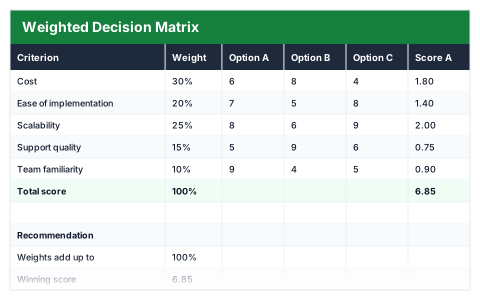
Big decisions are easier to make, and to explain, when the reasoning is written down. This Excel weighted decision matrix lists your criteria with a weight for each, scores up to three options from 1 to 10 on every criterion and adds up the weighted scores.
It names the recommended option, shows the winning score and its margin over the runner-up, and checks that the weights add up to 100%.
Good for
- →Choosing between suppliers, software or locations
- →Making a hiring or investment decision as a team
- →Recording why an option was chosen
What it works out for you
Recommendation
- →Weights add up to
- →Winning score
- →Recommended option
- →Margin over runner-up
What you fill in
The table has 8 columns. Calculated columns fill themselves in; the rest are yours to type over.
- →Criterion
- →Weight
- →Option A
- →Option B
- →Option C
- →Score A
- →Score B
- →Score C
How to use it
Score each option 1–10 per criterion. Weights decide what matters — make sure they add to 100%.
The file opens with sample rows so you can see every formula working before you change anything. Type your own figures over them. When you need more rows, insert them inside the existing block rather than underneath it, so the totals keep covering every row.
Functions it uses
Every one of these exists in Excel, Google Sheets and LibreOffice, so the file behaves the same wherever you open it.
INDEXLARGEMATCHMAXSUMQuestions about the Weighted Decision Matrix
How do I choose the weights?
Agree what matters most before anyone scores. Give important criteria larger weights and make sure they add up to 100%.
What if two options are very close?
The margin over the runner-up shows how close it is. A narrow margin is a sign to look again at the scores or weights before deciding.
How is this different from the Feature Comparison Matrix?
The decision matrix scores options on weighted criteria. The comparison matrix records whether each option has each feature and fails any option missing a must-have.