Data template
Data Cleaning Checklist
Twelve checks to run before any analysis, with progress tracked as you work.
- Live formulas
- 4
- Columns
- 5
- File
- 8 KB
$5
Checkout opening soonOr get it with all 66 paid templates in the complete pack — $45.
Works in Excel 2013 and later, Microsoft 365, Google Sheets and LibreOffice Calc. Set up to print landscape on one page wide.
About this Data Cleaning Checklist template
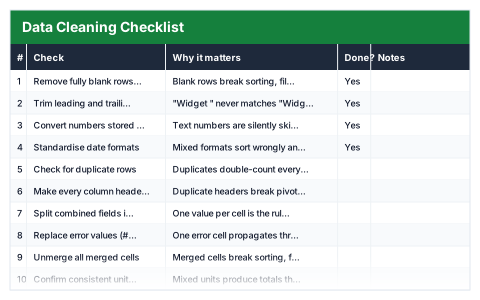
Most analysis mistakes start with data that was never checked. This Excel data cleaning checklist sets out twelve checks to work through before you analyse a dataset — from blank rows and stray spaces to duplicates, merged cells and hidden data — each with a note on why it matters.
Mark each check Yes, No or N/A as you go, and the progress summary shows checks complete, not applicable, still outstanding and the percentage complete.
Good for
- →Preparing a dataset before building a report
- →Checking data received from a client or another team
- →Giving junior analysts a consistent routine
What it works out for you
Progress
- →Checks complete
- →Not applicable
- →Still outstanding
- →% complete
What you fill in
The table has 5 columns. Calculated columns fill themselves in; the rest are yours to type over.
- →#
- →Check
- →Why it matters
- →Done?
- →Notes
How to use it
Work top to bottom before analysing anything. Mark each check Yes, No or N/A — completion tracks itself.
The file opens with sample rows so you can see every formula working before you change anything. Type your own figures over them. When you need more rows, insert them inside the existing block rather than underneath it, so the totals keep covering every row.
Functions it uses
Every one of these exists in Excel, Google Sheets and LibreOffice, so the file behaves the same wherever you open it.
COUNTACOUNTIFIFERRORQuestions about the Data Cleaning Checklist
What does the checklist cover?
Blank rows and columns, leading and trailing spaces, numbers stored as text, date formats, duplicate rows, unique headers, combined fields, error values, merged cells, units and currency, hidden rows and sheets, and checking totals against a known source.
Why use a checklist at all?
Cleaning steps are easy to skip under time pressure. A checklist makes the routine the same every time, so problems are caught before they reach a report.
Can I add my own checks?
Yes. Insert rows inside the list and the progress figures include them.