Finance template
VAT Return Summary
A quarter of sales and purchases logged once, adding straight up into the figures a VAT return asks for.
- Live formulas
- 57
- Columns
- 8
- File
- 9 KB
$5
Checkout opening soonOr get it with all 66 paid templates in the complete pack — $45.
Works in Excel 2013 and later, Microsoft 365, Google Sheets and LibreOffice Calc. Set up to print on one page wide.
About this VAT Return Summary template
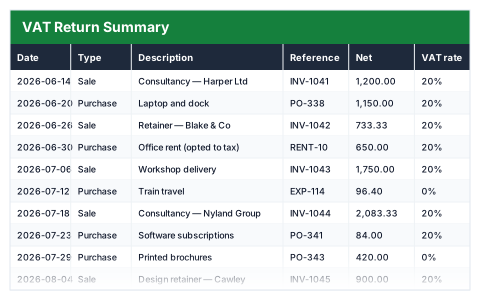
Preparing a VAT return is much easier when the figures are already added up. This Excel VAT return summary logs each sale and purchase once with its net amount and VAT rate, and works out the VAT and gross amount on every line.
The return figures show VAT due on sales, VAT reclaimed on purchases, the net VAT to pay or reclaim, and total sales and purchases excluding VAT. Because the rate is entered per line, it stays correct when rates change.
Good for
- →Small VAT-registered businesses preparing a quarterly return
- →Checking bookkeeping software figures against your own records
- →Keeping standard, reduced and zero-rated items in one place
What it works out for you
Return figures
- →VAT due on sales
- →VAT reclaimed on purchases
- →Net VAT to pay (or reclaim)
- →Total sales excluding VAT
- →Total purchases excluding VAT
- →Sales including VAT
- →Entries at the zero rate
- →Effective rate on sales
- →Entries in the quarter
What you fill in
The table has 8 columns. Calculated columns fill themselves in; the rest are yours to type over.
- →Date
- →Type
- →Description
- →Reference
- →Net
- →VAT rate
- →VAT
- →Gross
How to use it
Rates are typed in per line, so this stays correct when rates change. It works out the figures from your own entries — it is not tax advice, and it is not filed for you.
The file opens with sample rows so you can see every formula working before you change anything. Type your own figures over them. When you need more rows, insert them inside the existing block rather than underneath it, so the totals keep covering every row.
Functions it uses
Every one of these exists in Excel, Google Sheets and LibreOffice, so the file behaves the same wherever you open it.
COUNTCOUNTIFIFERRORROUNDSUMSUMIFTODAYQuestions about the VAT Return Summary
Does it submit my VAT return?
No. It works out the figures from your entries so you can check them. You still file through software that works with HMRC's Making Tax Digital.
Can I use different VAT rates?
Yes. The rate is typed on each line, so standard, reduced and zero-rated items can sit in the same quarter.
Is this tax advice?
No. It adds up the numbers you enter. If you are unsure how a sale or purchase should be treated for VAT, check with an accountant.