Finance template
Simple Cash Book
Money in, money out, and a balance that runs down every row so you always know where you stand.
- Live formulas
- 33
- Columns
- 6
- File
- 8 KB
Free
Download .xlsxNo signup, no email. Yours to edit and use commercially.
Works in Excel 2013 and later, Microsoft 365, Google Sheets and LibreOffice Calc. Set up to print on one page wide.
About this Simple Cash Book template
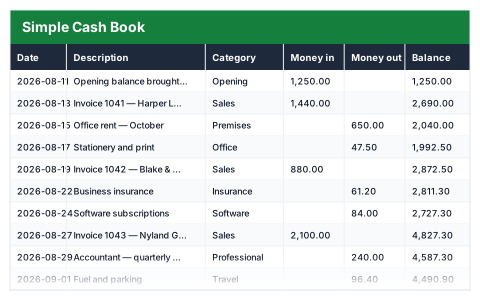
A cash book is the simplest set of accounts there is: every payment in, every payment out, and the balance after each one. This free Excel cash book keeps a running balance on every row, so you can see exactly when money moved and what you had at any point.
The summary gives your closing balance, total money in and out, the net movement and your largest single payment out.
Good for
- →Sole traders and freelancers keeping simple day-to-day accounts
- →Clubs, societies and small charities recording their money
- →Checking a balance transaction by transaction
What it works out for you
Position
- →Closing balance
- →Total money in
- →Total money out
- →Net movement
- →Largest single payment out
- →Transactions logged
What you fill in
The table has 6 columns. Calculated columns fill themselves in; the rest are yours to type over.
- →Date
- →Description
- →Category
- →Money in
- →Money out
- →Balance
How to use it
One row per transaction, oldest first. The balance carries down the column — insert new rows inside the block so it keeps running.
The file opens with sample rows so you can see every formula working before you change anything. Type your own figures over them. When you need more rows, insert them inside the existing block rather than underneath it, so the totals keep covering every row.
Functions it uses
Every one of these exists in Excel, Google Sheets and LibreOffice, so the file behaves the same wherever you open it.
COUNTMAXSUMTODAYQuestions about the Simple Cash Book
How does the running balance work?
Each row adds its money in and subtracts its money out from the balance on the row above. Keep transactions oldest first so the balance reads correctly down the page.
What happens if I add rows at the bottom?
Insert new rows inside the existing block instead. The balance carries down and the totals keep covering every row.
Is this the same as a bank reconciliation?
It is the record you reconcile against. If the closing balance here does not match your bank statement, the difference is a transaction that is missing or wrong.