Finance template
Monthly Budget Tracker
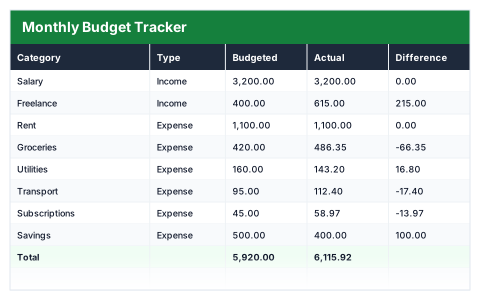
Planned against actual by category, with income and expenses split automatically.
- Live formulas
- 14
- Columns
- 5
- File
- 8 KB
Free
Download .xlsxNo signup, no email. Yours to edit and use commercially.
Works in Excel 2013 and later, Microsoft 365, Google Sheets and LibreOffice Calc. Set up to print on one page wide.
About this Monthly Budget Tracker template
A monthly budget only works if you compare what you planned with what actually went out. This free Excel budget tracker puts both side by side for every category, works out the difference per line, and splits income from expenses automatically so the totals stay right.
It finishes with the four numbers that matter each month: total income, total expenses, what is left over and your savings rate.
Good for
- →Checking where a month's money actually went against the plan
- →Spotting the categories you consistently overspend on
- →Tracking your savings rate from one month to the next
What it works out for you
Summary
- →Total income
- →Total expenses
- →Left over
- →Savings rate
What you fill in
The table has 5 columns. Calculated columns fill themselves in; the rest are yours to type over.
- →Category
- →Type
- →Budgeted
- →Actual
- →Difference
How to use it
Type over the sample rows. Difference, totals and the summary all recalculate. Use the Type dropdown so the income and expense splits stay accurate.
The file opens with sample rows so you can see every formula working before you change anything. Type your own figures over them. When you need more rows, insert them inside the existing block rather than underneath it, so the totals keep covering every row.
Functions it uses
Every one of these exists in Excel, Google Sheets and LibreOffice, so the file behaves the same wherever you open it.
IFIFERRORSUMSUMIFQuestions about the Monthly Budget Tracker
How does the budget tracker know what is income and what is an expense?
Each row has a Type dropdown set to Income or Expense. The totals use SUMIF on that column, so a row lands in the right total as long as its Type is set.
Can I add more budget categories?
Yes. Insert new rows inside the existing block rather than below the last one, and every total and the savings rate will include them.
What does the savings rate show?
What is left over after expenses, divided by total income — the share of your income you kept that month.