HR template
Training Matrix
Who is trained on what, where the gaps are, and which certificates expire soon.
- Live formulas
- 17
- Columns
- 9
- File
- 8 KB
$5
Checkout opening soonOr get it with all 66 paid templates in the complete pack — $45.
Works in Excel 2013 and later, Microsoft 365, Google Sheets and LibreOffice Calc. Set up to print landscape on one page wide.
About this Training Matrix template
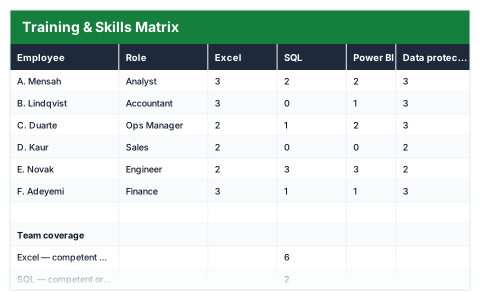
A training matrix shows at a glance who can do what, and where the team is thin. This Excel template rates each employee on each skill from 0 (none) to 3 (expert) and works out their average level and number of gaps.
The team coverage summary shows how many people are competent or better in each skill, the total number of skill gaps and the weakest skill across the team.
Good for
- →Planning training budgets around real gaps
- →Making sure more than one person can cover critical tasks
- →Tracking how skills develop over time
What it works out for you
Team coverage
- →Excel — competent or better
- →SQL — competent or better
- →Power BI — competent or better
- →Total skill gaps (zeros)
- →Weakest skill (avg)
What you fill in
The table has 9 columns. Calculated columns fill themselves in; the rest are yours to type over.
- →Employee
- →Role
- →Excel
- →SQL
- →Power BI
- →Data protection
- →H&S
- →Avg level
- →Gaps
How to use it
Mark each skill 0 (none), 1 (aware), 2 (competent) or 3 (expert). Coverage shows where the team is thin.
The file opens with sample rows so you can see every formula working before you change anything. Type your own figures over them. When you need more rows, insert them inside the existing block rather than underneath it, so the totals keep covering every row.
Functions it uses
Every one of these exists in Excel, Google Sheets and LibreOffice, so the file behaves the same wherever you open it.
AVERAGECOUNTIFMINSUMQuestions about the Training Matrix
What do the levels mean?
0 is none, 1 is aware, 2 is competent and 3 is expert.
What counts as a gap?
A skill rated 0 for an employee.
Can I change the skills?
Yes. Rename the skill columns to whatever your team needs, such as systems, qualifications or safety training.