HR template
Employee Leave Tracker
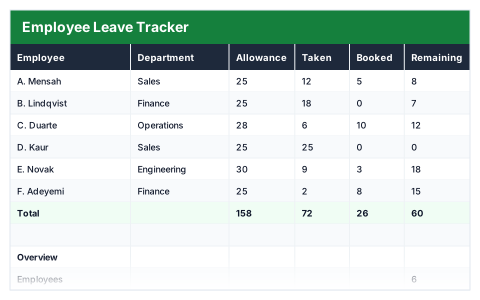
Allowance minus taken and booked, per person, with a flag when someone has none left.
- Live formulas
- 26
- Columns
- 8
- File
- 8 KB
$5
Checkout opening soonOr get it with all 66 paid templates in the complete pack — $45.
Works in Excel 2013 and later, Microsoft 365, Google Sheets and LibreOffice Calc. Set up to print on one page wide.
About this Employee Leave Tracker template
Holiday disputes usually come down to nobody being sure what is left. This Excel employee leave tracker records each person's annual allowance, the days they have taken and the days booked but not yet taken, and works out how many days remain.
It flags anyone with no leave left, and the overview shows the number of employees, the average percentage used and the days still to be taken across the team.
Good for
- →Small businesses managing annual leave without HR software
- →Approving holiday requests with the balance in front of you
- →Spotting who needs to take leave before the year ends
What it works out for you
Overview
- →Employees
- →With no leave left
- →Average % used
- →Days still to be taken
What you fill in
The table has 8 columns. Calculated columns fill themselves in; the rest are yours to type over.
- →Employee
- →Department
- →Allowance
- →Taken
- →Booked
- →Remaining
- →% used
- →Flag
How to use it
Booked means approved but not yet taken. Remaining deducts both, so it is the number someone can still request.
The file opens with sample rows so you can see every formula working before you change anything. Type your own figures over them. When you need more rows, insert them inside the existing block rather than underneath it, so the totals keep covering every row.
Functions it uses
Every one of these exists in Excel, Google Sheets and LibreOffice, so the file behaves the same wherever you open it.
AVERAGECOUNTACOUNTIFIFIFERRORSUMQuestions about the Employee Leave Tracker
What is the difference between taken and booked?
Taken is leave already used. Booked is leave approved for dates still to come. Remaining deducts both, so it is what someone can still request.
Does it work out statutory holiday entitlement?
No. You enter each person's allowance. Check their contract and statutory entitlement when you set it.
Can I record sickness here too?
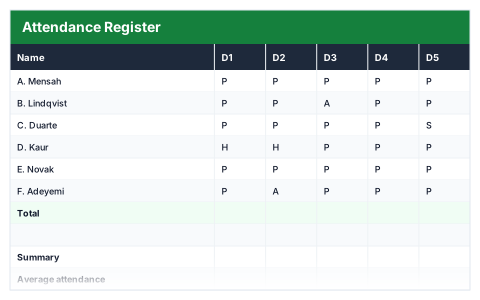
It is designed for holiday. The Attendance Register records sickness and absence day by day.