HR template
Attendance Register
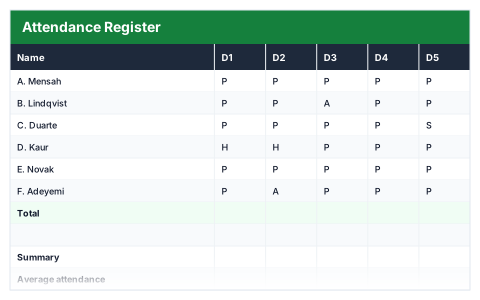
Ten-day grid that tallies present, absent, holiday and sick per person.
- Live formulas
- 38
- Columns
- 16
- File
- 9 KB
$5
Checkout opening soonOr get it with all 66 paid templates in the complete pack — $45.
Works in Excel 2013 and later, Microsoft 365, Google Sheets and LibreOffice Calc. Set up to print landscape on one page wide.
About this Attendance Register template
An attendance register gives a clear record of who was in, who was off and why. This Excel template uses a ten-day grid where each day is marked P for present, A for absent, H for holiday or S for sick, picked from a dropdown so entries stay consistent.
It tallies each code per person and works out their attendance percentage, and the summary shows average attendance, total absences and sick days, and how many people had perfect attendance.
Good for
- →Recording staff attendance over a fortnight
- →Clubs, classes and training courses
- →Spotting patterns of absence early
What it works out for you
Summary
- →Average attendance
- →Total absences
- →Total sick days
- →Perfect attendance
What you fill in
The table has 16 columns. Calculated columns fill themselves in; the rest are yours to type over.
- →Name
- →D1
- →D2
- →D3
- →D4
- →D5
- →D6
- →D7
- →D8
- →D9
- →D10
- →Present
- →Absent
- →Holiday
- →Sick
- →% present
How to use it
Mark each day P (present), A (absent), H (holiday) or S (sick) using the dropdown. The tallies and attendance rate follow.
The file opens with sample rows so you can see every formula working before you change anything. Type your own figures over them. When you need more rows, insert them inside the existing block rather than underneath it, so the totals keep covering every row.
Functions it uses
Every one of these exists in Excel, Google Sheets and LibreOffice, so the file behaves the same wherever you open it.
AVERAGECOUNTACOUNTIFIFERRORSUMQuestions about the Attendance Register
Why use codes rather than typing reasons?
The tallies count exact codes. The dropdown keeps every entry to P, A, H or S so the totals are right.
Can I track more than ten days?
Yes. Insert extra day columns inside the existing grid so the tallies include them.
Does it work in Google Sheets?
Yes. The dropdowns and COUNTIF tallies work the same in Excel, Google Sheets and LibreOffice.