Data template
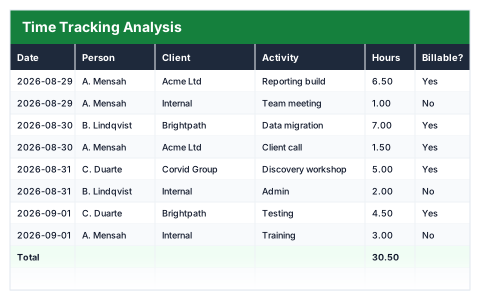
Time Tracking Analysis
Where the hours actually went, split billable against non-billable by client and activity.
- Live formulas
- 14
- Columns
- 7
- File
- 8 KB
$5
Checkout opening soonOr get it with all 66 paid templates in the complete pack — $45.
Works in Excel 2013 and later, Microsoft 365, Google Sheets and LibreOffice Calc. Set up to print landscape on one page wide.
About this Time Tracking Analysis template
The hours you bill are rarely all the hours you work. This Excel time tracking analysis logs each block of work with the date, person, client, activity and hours, marks it billable or not, and values billable time at your hourly rate.
The utilisation summary shows billable and non-billable hours, the utilisation rate, billable value and your effective hourly rate across every hour you worked.
Good for
- →Freelancers checking how much of their time is paid
- →Agencies reviewing time spent per client
- →Setting prices from your real effective rate
What it works out for you
Utilisation
- →Billable hours
- →Non-billable hours
- →Utilisation rate
- →Billable value
- →Effective hourly rate
What you fill in
The table has 7 columns. Calculated columns fill themselves in; the rest are yours to type over.
- →Date
- →Person
- →Client
- →Activity
- →Hours
- →Billable?
- →Value
Settings in the “Rate” box
- →Billable hourly rate
How to use it
One row per block of work. Billable value uses the rate below, and the utilisation figure is the one worth watching.
The file opens with sample rows so you can see every formula working before you change anything. Type your own figures over them. When you need more rows, insert them inside the existing block rather than underneath it, so the totals keep covering every row.
Shaded, boxed cells below the table are settings the formulas read from. Change those first — every row that depends on them updates at once.
Functions it uses
Every one of these exists in Excel, Google Sheets and LibreOffice, so the file behaves the same wherever you open it.
IFIFERRORSUMSUMIFQuestions about the Time Tracking Analysis
What is the utilisation rate?
Billable hours as a share of all hours logged.
What is the effective hourly rate?
Billable value spread across all the hours you worked, billable or not. It shows what you really earn per hour once admin and unpaid work are included.
Can I use different rates for different clients?
The template uses one billable rate. For different rates, add a rate column and change the value formula to use it.