Business template
Supplier Price Comparison
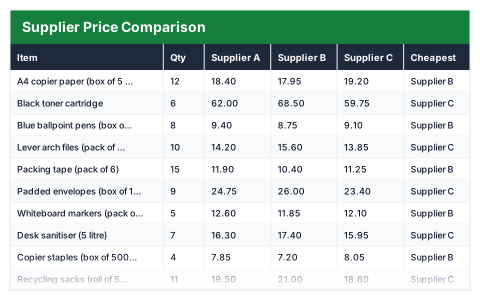
Three quotes side by side, the cheapest picked per line, and what buying the best of each saves you.
- Live formulas
- 55
- Columns
- 9
- File
- 9 KB
Free
Download .xlsxNo signup, no email. Yours to edit and use commercially.
Works in Excel 2013 and later, Microsoft 365, Google Sheets and LibreOffice Calc. Set up to print landscape on one page wide.
About this Supplier Price Comparison template
Comparing supplier quotes by eye is slow and easy to get wrong. This free Excel price comparison template puts three suppliers' unit prices side by side for every item, picks the cheapest on each line and works out the line total at the best price.
The summary compares buying the whole order from each supplier with buying every line at its best price, so you can see whether splitting the order is worth the extra admin.
Good for
- →Comparing quotes before a bulk order
- →Reviewing regular suppliers against alternatives
- →Backing up a purchasing decision with numbers
What it works out for you
What to buy
- →Whole order from Supplier A
- →Whole order from Supplier B
- →Whole order from Supplier C
- →Cheapest single supplier
- →Best price on every line
- →Saved by splitting the order
- →Lines where A wins
- →Lines where B wins
- →Lines where C wins
What you fill in
The table has 9 columns. Calculated columns fill themselves in; the rest are yours to type over.
- →Item
- →Qty
- →Supplier A
- →Supplier B
- →Supplier C
- →Cheapest
- →Best unit price
- →Line total
- →Saving vs dearest
How to use it
Put each supplier’s unit price in their column. The cheapest is picked per line, and the summary shows whether splitting the order beats using one supplier.
The file opens with sample rows so you can see every formula working before you change anything. Type your own figures over them. When you need more rows, insert them inside the existing block rather than underneath it, so the totals keep covering every row.
Functions it uses
Every one of these exists in Excel, Google Sheets and LibreOffice, so the file behaves the same wherever you open it.
COUNTIFIFERRORINDEXMATCHMAXMINSUMSUMPRODUCTQuestions about the Supplier Price Comparison
How does it pick the cheapest supplier?
For each item it finds the lowest of the three unit prices and returns that supplier's name from the column header using INDEX and MATCH.
Can I rename the suppliers?
Yes. Change the column headers to your suppliers' names and the Cheapest column shows the new names. Update the three 'Lines where' labels in the summary to match.
What does 'saved by splitting the order' mean?
The difference between the cheapest single supplier for the whole order and buying every line from whoever is cheapest for that item.