Business template
Invoice Payment Tracker
Every invoice you have raised, what is still unpaid, and how many days late each one is.
- Live formulas
- 49
- Columns
- 8
- File
- 9 KB
Free
Download .xlsxNo signup, no email. Yours to edit and use commercially.
Works in Excel 2013 and later, Microsoft 365, Google Sheets and LibreOffice Calc. Set up to print on one page wide.
About this Invoice Payment Tracker template
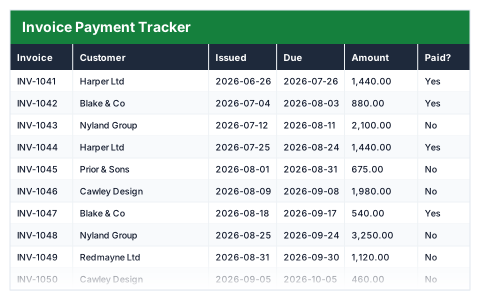
Sending invoices is easy; knowing which ones have actually been paid is harder. This free Excel invoice payment tracker lists every invoice with its customer, amount and issue date, sets the due date from your payment terms and counts how many days late each unpaid invoice is.
The summary shows the total invoiced, what has been paid, what is still outstanding, how many invoices are past due and the longest delay.
Good for
- →Freelancers keeping on top of unpaid invoices
- →Small businesses without accounting software
- →Knowing exactly who to chase this week
What it works out for you
Where you stand
- →Total invoiced
- →Paid
- →Still outstanding
- →Invoices unpaid
- →Invoices past due
- →Value past due
- →Worst delay (days)
What you fill in
The table has 8 columns. Calculated columns fill themselves in; the rest are yours to type over.
- →Invoice
- →Customer
- →Issued
- →Due
- →Amount
- →Paid?
- →Outstanding
- →Days late
Settings in the “Settings” box
- →Payment terms (days from issue)
How to use it
Set your payment terms in the box below the table — every due date follows from it. Days late counts from today, so it is right every time you open the file.
The file opens with sample rows so you can see every formula working before you change anything. Type your own figures over them. When you need more rows, insert them inside the existing block rather than underneath it, so the totals keep covering every row.
Shaded, boxed cells below the table are settings the formulas read from. Change those first — every row that depends on them updates at once.
Functions it uses
Every one of these exists in Excel, Google Sheets and LibreOffice, so the file behaves the same wherever you open it.
COUNTIFIFMAXORSUMSUMIFTODAYQuestions about the Invoice Payment Tracker
How is the due date set?
It is the issue date plus the payment terms you set once below the table, such as 30 days. Change the terms and every due date updates.
How are days late calculated?
Against today's date, for invoices not marked as paid. An invoice that is not yet due shows zero.
How is this different from the Aged Debtors Report?
This tracker records every invoice and whether it has been paid. The Aged Debtors Report covers only unpaid invoices and groups them into 30, 60 and 90+ day buckets.