Business template
Expense Report
Claimable and non-claimable split out automatically, with a category breakdown.
- Live formulas
- 9
- Columns
- 5
- File
- 8 KB
Free
Download .xlsxNo signup, no email. Yours to edit and use commercially.
Works in Excel 2013 and later, Microsoft 365, Google Sheets and LibreOffice Calc. Set up to print on one page wide.
About this Expense Report template
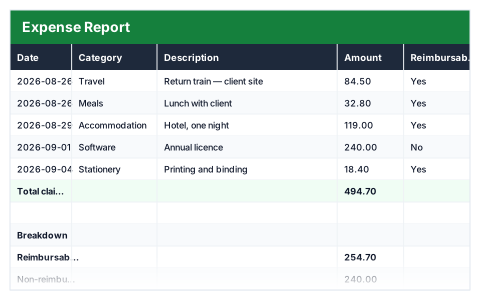
An expense claim should be quick to fill in and easy to approve. This free Excel expense report lists each expense with its date, category, description and amount, and a Yes or No for whether it is reimbursable.
The breakdown separates reimbursable from non-reimbursable spending and totals every category — travel, meals, accommodation, software, stationery and other — so the claim adds up without a pivot table.
Good for
- →Employees claiming back work expenses
- →Contractors recharging costs to a client
- →Keeping business spending organised for tax records
What it works out for you
Breakdown
- →Reimbursable
- →Non-reimbursable
- →Travel
- →Meals
- →Accommodation
- →Software
- →Stationery
- →Other
What you fill in
The table has 5 columns. Calculated columns fill themselves in; the rest are yours to type over.
- →Date
- →Category
- →Description
- →Amount
- →Reimbursable
How to use it
Mark each row Yes or No in Reimbursable — the claim total only counts the Yes rows.
The file opens with sample rows so you can see every formula working before you change anything. Type your own figures over them. When you need more rows, insert them inside the existing block rather than underneath it, so the totals keep covering every row.
Functions it uses
Every one of these exists in Excel, Google Sheets and LibreOffice, so the file behaves the same wherever you open it.
SUMSUMIFQuestions about the Expense Report
What counts towards the claim total?
Only rows marked Yes in the Reimbursable column. Rows marked No are totalled separately so they are still recorded.
Can I add my own expense categories?
Yes. Use the new category name on your rows and add a matching line to the breakdown by copying one of the existing SUMIF formulas.
Does it work in Google Sheets?
Yes. It only uses SUM and SUMIF, which behave the same in Excel, Google Sheets and LibreOffice.