Business template
Invoice Template
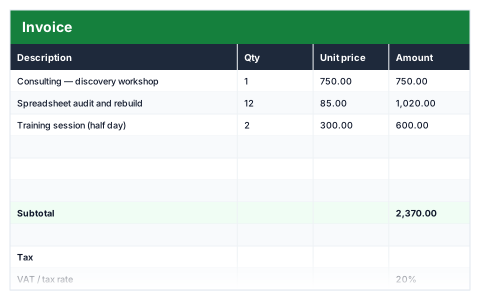
Line items price themselves, with subtotal, tax at your rate and total due.
- Live formulas
- 9
- Columns
- 4
- File
- 8 KB
Free
Download .xlsxNo signup, no email. Yours to edit and use commercially.
Works in Excel 2013 and later, Microsoft 365, Google Sheets and LibreOffice Calc. Set up to print on one page wide.
About this Invoice Template template
An invoice needs to be right first time, because a wrong total costs both time and credibility. This free Excel invoice template multiplies quantity by unit price on every line, adds up the subtotal, applies tax at the rate you set and shows the total due.
Empty line rows stay blank rather than showing zeros, so the invoice looks finished whether it has two lines or ten.
Good for
- →Freelancers and sole traders billing clients
- →Small businesses that do not need accounting software yet
- →Sending a quick one-off invoice
What it works out for you
Total
- →Tax
- →Total due
What you fill in
The table has 4 columns. Calculated columns fill themselves in; the rest are yours to type over.
- →Description
- →Qty
- →Unit price
- →Amount
Settings in the “Tax” box
- →VAT / tax rate
Settings in the “Invoice details” box
- →Invoice number
- →Invoice date
- →Payment terms
How to use it
Fill in your details and the client's above the table, then the line items. Empty rows stay blank rather than showing zeros.
The file opens with sample rows so you can see every formula working before you change anything. Type your own figures over them. When you need more rows, insert them inside the existing block rather than underneath it, so the totals keep covering every row.
Shaded, boxed cells below the table are settings the formulas read from. Change those first — every row that depends on them updates at once.
Functions it uses
Every one of these exists in Excel, Google Sheets and LibreOffice, so the file behaves the same wherever you open it.
IFROUNDSUMQuestions about the Invoice Template
Can I change the VAT or tax rate?
Yes. Set the rate in the tax box and the tax and total due recalculate. Set it to zero if you are not VAT-registered.
Can I add my logo?
Yes. It is a normal Excel file, so you can add a logo and change fonts and colours without affecting the formulas.
How do I keep track of whether invoices are paid?
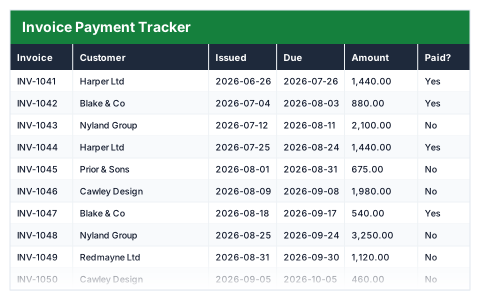
Use the free Invoice Payment Tracker alongside it. It lists every invoice, what is still outstanding and how many days late each one is.