HR template
Staff Turnover & Headcount Tracker
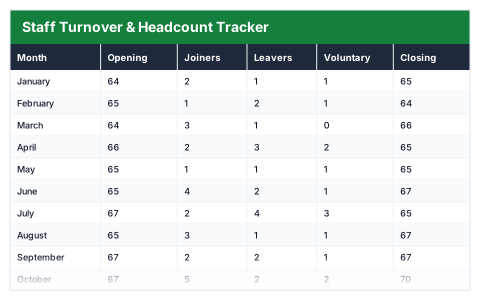
Joiners and leavers month by month, with the turnover rate calculated on average headcount, properly.
- Live formulas
- 79
- Columns
- 9
- File
- 9 KB
$5
Checkout opening soonOr get it with all 66 paid templates in the complete pack — $45.
Works in Excel 2013 and later, Microsoft 365, Google Sheets and LibreOffice Calc. Set up to print landscape on one page wide.
About this Staff Turnover & Headcount Tracker template
Staff turnover is expensive, and you can only manage it if you measure it. This Excel staff turnover and headcount tracker records joiners and leavers each month, carries headcount forward and works out turnover against average headcount.
The year summary shows headcount at the start and now, joiners and leavers, annual and voluntary turnover rates, net headcount change and the estimated replacement cost of everyone who left.
Good for
- →HR teams reporting turnover to the board
- →Spotting the months when people tend to leave
- →Putting a cost on staff turnover
What it works out for you
The year
- →Headcount at the start
- →Headcount now
- →Average headcount
- →Joiners
- →Leavers
- →Of which resigned
- →Annual turnover rate
- →Voluntary turnover rate
- →Net headcount change
- →Headcount growth
- →Worst month for leavers
- →Months that shrank
- →Replacement cost of leavers
What you fill in
The table has 9 columns. Calculated columns fill themselves in; the rest are yours to type over.
- →Month
- →Opening
- →Joiners
- →Leavers
- →Voluntary
- →Closing
- →Average headcount
- →Turnover
- →Net change
Settings in the “Assumption” box
- →Cost to replace one leaver
How to use it
Headcount carries forward: enter the opening figure once, then joiners and leavers. Turnover is measured against average headcount, which is the figure that stands up to scrutiny.
The file opens with sample rows so you can see every formula working before you change anything. Type your own figures over them. When you need more rows, insert them inside the existing block rather than underneath it, so the totals keep covering every row.
Shaded, boxed cells below the table are settings the formulas read from. Change those first — every row that depends on them updates at once.
Functions it uses
Every one of these exists in Excel, Google Sheets and LibreOffice, so the file behaves the same wherever you open it.
AVERAGECOUNTIFIFERRORMAXSUMQuestions about the Staff Turnover & Headcount Tracker
How is the turnover rate calculated?
Leavers divided by average headcount. Using the average of opening and closing headcount gives a fairer rate than headcount on a single day.
What is voluntary turnover?
People who chose to leave, such as resignations, as opposed to dismissals or redundancies.
How is the replacement cost worked out?
The number of leavers multiplied by the cost to replace one leaver, which you set to reflect recruitment, training and lost productivity.