Projects template
Sprint Burndown
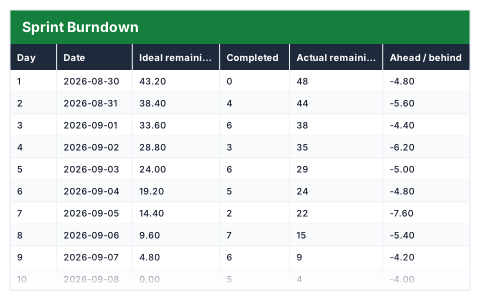
Ideal against actual points remaining each day, with the velocity you would need to finish on time.
- Live formulas
- 63
- Columns
- 7
- File
- 8 KB
$5
Checkout opening soonOr get it with all 66 paid templates in the complete pack — $45.
Works in Excel 2013 and later, Microsoft 365, Google Sheets and LibreOffice Calc. Set up to print on one page wide.
About this Sprint Burndown template
A burndown shows whether a sprint will finish on time while there is still time to act. This Excel sprint burndown takes the points committed and the working days, draws the ideal line and tracks the actual points remaining as you enter what is completed each day.
The summary shows points completed and remaining, average velocity, the velocity needed to finish and how far ahead or behind the ideal line you are.
Good for
- →Scrum teams tracking a sprint outside their ticketing tool
- →Daily stand-ups that need one clear progress number
- →Looking back at how a sprint went in a retrospective
What it works out for you
Are you going to make it?
- →Points committed
- →Points completed
- →Points remaining
- →Sprint complete
- →Days used
- →Days left
- →Average velocity per day
- →Velocity needed to finish
- →Days at the current rate
- →Ahead / behind the ideal line
- →Days with nothing completed
What you fill in
The table has 7 columns. Calculated columns fill themselves in; the rest are yours to type over.
- →Day
- →Date
- →Ideal remaining
- →Completed
- →Actual remaining
- →Ahead / behind
- →Needed per day
Settings in the “Sprint” box
- →Points committed
- →Working days in the sprint
How to use it
Enter points completed each day. The ideal line, remaining work, variance and the required run rate all follow from the sprint totals below.
The file opens with sample rows so you can see every formula working before you change anything. Type your own figures over them. When you need more rows, insert them inside the existing block rather than underneath it, so the totals keep covering every row.
Shaded, boxed cells below the table are settings the formulas read from. Change those first — every row that depends on them updates at once.
Functions it uses
Every one of these exists in Excel, Google Sheets and LibreOffice, so the file behaves the same wherever you open it.
COUNTCOUNTIFIFERRORMAXSUMTODAYQuestions about the Sprint Burndown
What is the ideal line?
The points that would remain each day if the team completed work at a steady rate from the first day to the last.
What does 'velocity needed to finish' mean?
The points per day the team must complete for the rest of the sprint to finish all the committed work.
Can I change the sprint length?
Set the points committed and working days in the Sprint box. The sheet has ten daily rows, so for a longer sprint insert extra rows inside the block.