Projects template
Project Budget Tracker
Variance per work package with an over-budget flag that colours itself.
- Live formulas
- 25
- Columns
- 7
- File
- 8 KB
$5
Checkout opening soonOr get it with all 66 paid templates in the complete pack — $45.
Works in Excel 2013 and later, Microsoft 365, Google Sheets and LibreOffice Calc. Set up to print on one page wide.
About this Project Budget Tracker template
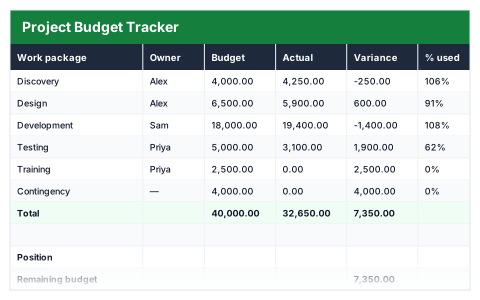
Project budgets rarely go wrong all at once; they drift one work package at a time. This Excel project budget tracker compares budget with actual spend for each work package, works out the variance and percentage used, and flags anything over budget.
The position summary shows remaining budget, the share of the budget used, how many packages are over and the largest overspend.
Good for
- →Project managers reporting spend to stakeholders
- →Catching overspends while there is still time to act
- →Tracking a renovation or event budget by area
What it works out for you
Position
- →Remaining budget
- →Budget used
- →Packages over budget
- →Largest overspend
What you fill in
The table has 7 columns. Calculated columns fill themselves in; the rest are yours to type over.
- →Work package
- →Owner
- →Budget
- →Actual
- →Variance
- →% used
- →Flag
How to use it
Enter actuals as they land. Variance, percentage used and the flag update as you go.
The file opens with sample rows so you can see every formula working before you change anything. Type your own figures over them. When you need more rows, insert them inside the existing block rather than underneath it, so the totals keep covering every row.
Functions it uses
Every one of these exists in Excel, Google Sheets and LibreOffice, so the file behaves the same wherever you open it.
COUNTIFIFIFERRORMINSUMQuestions about the Project Budget Tracker
What is a work package?
A chunk of the project with its own budget and owner, such as design, build or testing. Tracking at this level shows where the money is going.
Should I enter committed costs or only money spent?
Actual spend. If you also want to include costs you have committed to but not yet paid, add them to Actual and note it so the figure is clear.
Can I use it for a non-work project?
Yes. A home renovation or an event works the same way — each room or area becomes a work package with its own budget.