Projects template
Resource Capacity Planner
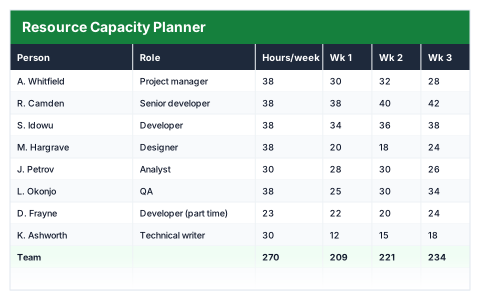
Hours booked against each person week by week, with anyone over their capacity flagged before it hurts.
- Live formulas
- 61
- Columns
- 14
- File
- 9 KB
$5
Checkout opening soonOr get it with all 66 paid templates in the complete pack — $45.
Works in Excel 2013 and later, Microsoft 365, Google Sheets and LibreOffice Calc. Set up to print landscape on one page wide.
About this Resource Capacity Planner template
Over-booking your best people is the fastest way to miss deadlines. This Excel resource capacity planner records the hours booked for each person across six weeks, compares them with their weekly capacity and works out utilisation.
Each person is marked Over capacity, At capacity, Comfortable or Under-used, and the summary shows team utilisation, spare hours, the busiest and quietest weeks and the hours you could still sell.
Good for
- →Agencies and consultancies planning who works on what
- →Checking capacity before agreeing to a new project
- →Balancing workload across a team
What it works out for you
Where the pressure is
- →Team capacity over 6 weeks (hours)
- →Hours booked
- →Team utilisation
- →Spare hours across the team
- →People over capacity
- →People under-used
- →Highest individual utilisation
- →Busiest week (hours booked)
- →Quietest week (hours booked)
- →Hours you could still sell
What you fill in
The table has 14 columns. Calculated columns fill themselves in; the rest are yours to type over.
- →Person
- →Role
- →Hours/week
- →Wk 1
- →Wk 2
- →Wk 3
- →Wk 4
- →Wk 5
- →Wk 6
- →Booked
- →Capacity
- →Spare
- →Utilisation
- →Status
How to use it
Put booked hours in each week column. Utilisation compares the total against the capacity you set per person, so over-booking shows up before the week starts.
The file opens with sample rows so you can see every formula working before you change anything. Type your own figures over them. When you need more rows, insert them inside the existing block rather than underneath it, so the totals keep covering every row.
Functions it uses
Every one of these exists in Excel, Google Sheets and LibreOffice, so the file behaves the same wherever you open it.
COUNTIFIFIFERRORMAXMINSUMQuestions about the Resource Capacity Planner
How is utilisation calculated?
Hours booked over the six weeks divided by that person's weekly capacity multiplied by six.
What counts as over capacity?
More hours booked than the person's capacity for the period. From 90% utilisation they show as At capacity, and below 60% as Under-used.
Can I plan part-time staff?
Yes. Set each person's hours per week, and their capacity and utilisation are worked out from that.