Projects template
RACI Matrix
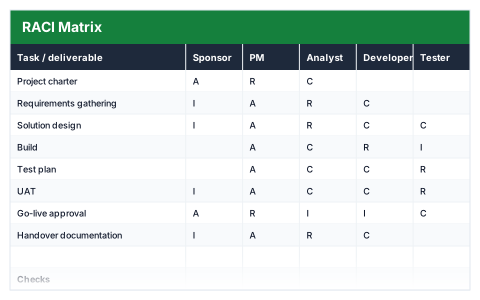
Who is Responsible, Accountable, Consulted and Informed — with a check that every task has exactly one A.
- Live formulas
- 12
- Columns
- 8
- File
- 8 KB
$5
Checkout opening soonOr get it with all 66 paid templates in the complete pack — $45.
Works in Excel 2013 and later, Microsoft 365, Google Sheets and LibreOffice Calc. Set up to print landscape on one page wide.
About this RACI Matrix template
A RACI matrix makes clear who does the work, who owns the outcome, who needs to be asked and who needs to be told. This Excel RACI template lists tasks against roles and lets you mark each cell R, A, C or I.
A check column confirms every task has exactly one A, because a task with nobody accountable — or two people accountable — is where projects stall.
Good for
- →Agreeing roles at the start of a project
- →Settling confusion over who signs something off
- →Bringing new people into an existing project
What it works out for you
Checks
- →Tasks
- →Tasks missing a single A
- →Total R assignments
- →Busiest role (R count, PM)
What you fill in
The table has 8 columns. Calculated columns fill themselves in; the rest are yours to type over.
- →Task / deliverable
- →Sponsor
- →PM
- →Analyst
- →Developer
- →Tester
- →Users
- →Check
How to use it
Mark each cell R, A, C or I. Every task needs exactly one A — the check column tells you when it does not.
The file opens with sample rows so you can see every formula working before you change anything. Type your own figures over them. When you need more rows, insert them inside the existing block rather than underneath it, so the totals keep covering every row.
Functions it uses
Every one of these exists in Excel, Google Sheets and LibreOffice, so the file behaves the same wherever you open it.
COUNTACOUNTIFIFQuestions about the RACI Matrix
What do R, A, C and I stand for?
Responsible does the work, Accountable owns the result and signs it off, Consulted gives input before a decision, and Informed is kept up to date afterwards.
Why only one A per task?
When two people are accountable, neither really is. The check column flags any task that does not have exactly one A.
Can I change the roles?
Yes. Rename the role column headers to the people or teams on your project.