Business template
Quote / Estimate
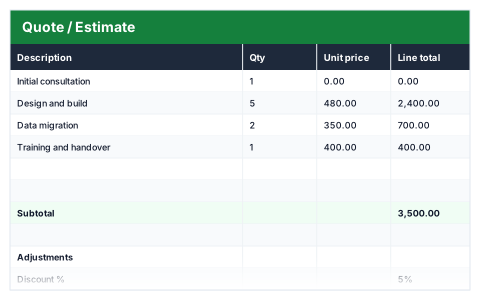
Line totals, an optional discount, tax and a valid-until date that sets itself.
- Live formulas
- 11
- Columns
- 4
- File
- 8 KB
$5
Checkout opening soonOr get it with all 66 paid templates in the complete pack — $45.
Works in Excel 2013 and later, Microsoft 365, Google Sheets and LibreOffice Calc. Set up to print on one page wide.
About this Quote / Estimate template
A clear quote wins work and avoids arguments later. This Excel quote and estimate template prices every line from quantity and unit price, then applies an optional discount and tax at the rates you set to give the total.
It includes a quote number, date and valid-until date, and blank line rows stay empty rather than showing zeros, so the quote looks finished however many lines you use.
Good for
- →Tradespeople and contractors quoting for jobs
- →Service businesses pricing a project
- →Sending an estimate before work is confirmed
What it works out for you
Total
- →Discount
- →Tax
- →Total
What you fill in
The table has 4 columns. Calculated columns fill themselves in; the rest are yours to type over.
- →Description
- →Qty
- →Unit price
- →Line total
Settings in the “Adjustments” box
- →Discount %
- →Tax rate
Settings in the “Quote details” box
- →Quote number
- →Date
- →Valid until
How to use it
Blank line rows stay empty rather than showing zeros, so the quote looks finished whether you use three lines or ten.
The file opens with sample rows so you can see every formula working before you change anything. Type your own figures over them. When you need more rows, insert them inside the existing block rather than underneath it, so the totals keep covering every row.
Shaded, boxed cells below the table are settings the formulas read from. Change those first — every row that depends on them updates at once.
Functions it uses
Every one of these exists in Excel, Google Sheets and LibreOffice, so the file behaves the same wherever you open it.
IFROUNDSUMTODAYQuestions about the Quote / Estimate
Is a quote the same as an estimate?
Not quite. A quote is usually a fixed price, while an estimate is a best guess that can change. The template works for either, so change the heading to suit.
How do the discount and tax work?
Set a discount percentage and a tax rate in the adjustments box. The discount, tax and total are all worked out from the line totals.
How do I keep track of whether the customer accepted?
The Quote Follow-Up Tracker lists sent quotes, flags those due for chasing and shows which have expired.