Business template
Purchase Order
Supplier details, line items, delivery and tax — totalled and ready to send.
- Live formulas
- 9
- Columns
- 5
- File
- 8 KB
$5
Checkout opening soonOr get it with all 66 paid templates in the complete pack — $45.
Works in Excel 2013 and later, Microsoft 365, Google Sheets and LibreOffice Calc. Set up to print on one page wide.
About this Purchase Order template
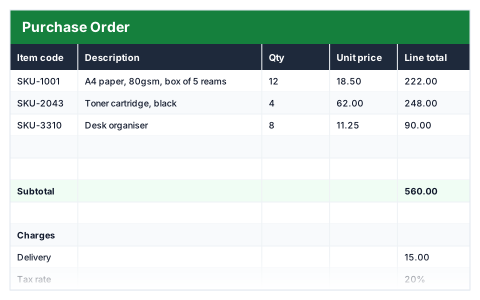
A purchase order confirms exactly what you are buying, at what price and when you need it. This Excel purchase order template records the PO number, supplier, order date and required-by date, then prices each line from quantity and unit price.
Delivery and tax are added at the amounts you set to give the order total, and unused line rows stay blank.
Good for
- →Small businesses formalising orders with suppliers
- →Keeping a written record of what was ordered and agreed
- →Checking supplier invoices against what you ordered
What it works out for you
Total
- →Tax
- →Total
What you fill in
The table has 5 columns. Calculated columns fill themselves in; the rest are yours to type over.
- →Item code
- →Description
- →Qty
- →Unit price
- →Line total
Settings in the “Charges” box
- →Delivery
- →Tax rate
Settings in the “Order details” box
- →PO number
- →Supplier
- →Order date
- →Required by
How to use it
Fill in the PO details at the bottom, then the lines. Blank rows stay blank.
The file opens with sample rows so you can see every formula working before you change anything. Type your own figures over them. When you need more rows, insert them inside the existing block rather than underneath it, so the totals keep covering every row.
Shaded, boxed cells below the table are settings the formulas read from. Change those first — every row that depends on them updates at once.
Functions it uses
Every one of these exists in Excel, Google Sheets and LibreOffice, so the file behaves the same wherever you open it.
IFROUNDSUMTODAYQuestions about the Purchase Order
Why use a purchase order at all?
It gives you and the supplier a written record of quantities and prices before the invoice arrives, which makes incorrect invoices easy to spot.
Can I add my company details and logo?
Yes. Add them above the table; the formulas are unaffected.
Does it keep a log of all my purchase orders?
No — each file is one purchase order. Save a copy per order with the PO number in the file name.