Projects template
Risk Register
Likelihood × impact scoring with a rating band that sets itself.
- Live formulas
- 17
- Columns
- 8
- File
- 8 KB
$5
Checkout opening soonOr get it with all 66 paid templates in the complete pack — $45.
Works in Excel 2013 and later, Microsoft 365, Google Sheets and LibreOffice Calc. Set up to print landscape on one page wide.
About this Risk Register template
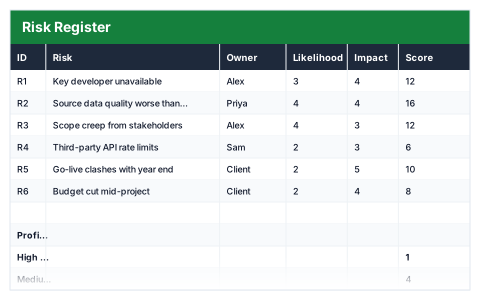
A risk register lists what could go wrong, how likely it is and how much damage it would do. This Excel template scores each risk by multiplying likelihood by impact, each from 1 to 5, and gives it a High, Medium or Low rating automatically.
The risk profile counts high, medium and low risks, shows the highest score and names your top risk, so reviews start with what matters most.
Good for
- →Project kick-offs and regular risk reviews
- →Health and safety or compliance risk logs
- →Showing a sponsor the risks that need decisions
What it works out for you
Profile
- →High risks
- →Medium risks
- →Low risks
- →Highest score
- →Top risk
What you fill in
The table has 8 columns. Calculated columns fill themselves in; the rest are yours to type over.
- →ID
- →Risk
- →Owner
- →Likelihood
- →Impact
- →Score
- →Rating
- →Mitigation
How to use it
Score likelihood and impact 1–5 each. The score and the High/Medium/Low band calculate — sort on Score to find what needs attention.
The file opens with sample rows so you can see every formula working before you change anything. Type your own figures over them. When you need more rows, insert them inside the existing block rather than underneath it, so the totals keep covering every row.
Functions it uses
Every one of these exists in Excel, Google Sheets and LibreOffice, so the file behaves the same wherever you open it.
COUNTIFIFINDEXMATCHMAXQuestions about the Risk Register
How is the risk score calculated?
Likelihood (1–5) multiplied by impact (1–5), giving a score from 1 to 25. The High, Medium or Low rating is set from that score.
What should go in the mitigation column?
What you will do to reduce the likelihood or the impact — ideally with who is doing it and by when.
How often should a risk register be reviewed?
Regularly; many teams review it at every project meeting, because scores change as work progresses and new risks appear.