HR template
Performance Review
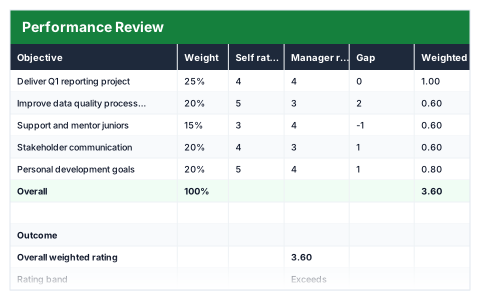
Weighted objectives with self and manager ratings side by side, and the gap between them.
- Live formulas
- 16
- Columns
- 7
- File
- 8 KB
$5
Checkout opening soonOr get it with all 66 paid templates in the complete pack — $45.
Works in Excel 2013 and later, Microsoft 365, Google Sheets and LibreOffice Calc. Set up to print on one page wide.
About this Performance Review template
The most useful part of a performance review is often where the employee and manager disagree. This Excel performance review template lists weighted objectives, records a self rating and a manager rating from 1 to 5 for each, and shows the gap between them.
It works out the overall weighted rating and rating band, shows the largest self-versus-manager gap and checks that the weights add up.
Good for
- →Annual or mid-year performance reviews
- →Preparing for a review conversation
- →Keeping reviews consistent across a team
What it works out for you
Outcome
- →Overall weighted rating
- →Rating band
- →Largest self/manager gap
- →Weights add up to
What you fill in
The table has 7 columns. Calculated columns fill themselves in; the rest are yours to type over.
- →Objective
- →Weight
- →Self rating
- →Manager rating
- →Gap
- →Weighted
- →Comments
How to use it
Rate 1–5. The gap column shows where the employee and manager see things differently — that is the conversation worth having.
The file opens with sample rows so you can see every formula working before you change anything. Type your own figures over them. When you need more rows, insert them inside the existing block rather than underneath it, so the totals keep covering every row.
Functions it uses
Every one of these exists in Excel, Google Sheets and LibreOffice, so the file behaves the same wherever you open it.
IFMAXMINSUMQuestions about the Performance Review
Why record both self and manager ratings?
Putting them side by side shows where views differ. Those gaps are usually the most valuable part of the conversation.
What should the weights reflect?
How important each objective is to the role over the review period. They should add up to 100%, and the summary checks this.
Can I change the rating scale?
The template uses 1 to 5. Using a different scale would also mean updating the rating bands.