HR template
Onboarding Checklist
Every task a new starter needs, by owner and due day, with completion tracked.
- Live formulas
- 18
- Columns
- 6
- File
- 9 KB
$5
Checkout opening soonOr get it with all 66 paid templates in the complete pack — $45.
Works in Excel 2013 and later, Microsoft 365, Google Sheets and LibreOffice Calc. Set up to print on one page wide.
About this Onboarding Checklist template
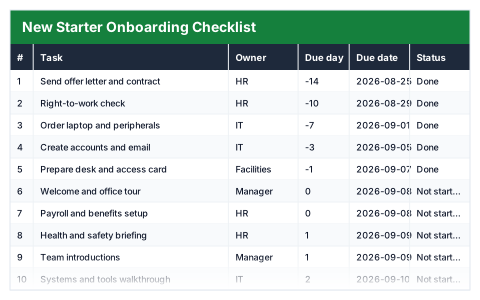
A good first week does not happen by accident; it happens because someone had a list. This Excel onboarding checklist sets out every task a new starter needs, with an owner and a due day counted from their start date.
Enter the start date once and every due date follows. Mark tasks Done as they are completed, and the summary shows tasks complete, tasks outstanding, percentage complete and anything overdue.
Good for
- →Managers preparing for a new starter
- →Small businesses without an HR system
- →Making sure IT, payroll and training are ready on day one
What it works out for you
Progress
- →Tasks complete
- →Tasks outstanding
- →% complete
- →Overdue
What you fill in
The table has 6 columns. Calculated columns fill themselves in; the rest are yours to type over.
- →#
- →Task
- →Owner
- →Due day
- →Due date
- →Status
Settings in the “Start date” box
- →New starter begins
How to use it
Due day counts from the start date below, so one date sets the whole schedule. Mark tasks Done and progress updates.
The file opens with sample rows so you can see every formula working before you change anything. Type your own figures over them. When you need more rows, insert them inside the existing block rather than underneath it, so the totals keep covering every row.
Shaded, boxed cells below the table are settings the formulas read from. Change those first — every row that depends on them updates at once.
Functions it uses
Every one of these exists in Excel, Google Sheets and LibreOffice, so the file behaves the same wherever you open it.
COUNTACOUNTIFCOUNTIFSIFERRORTODAYQuestions about the Onboarding Checklist
How are the due dates set?
Each task has a due day relative to the start date, such as day 1 or day 5. Enter the start date and every due date is calculated from it.
Who should own each task?
Whoever actually does it — the line manager, IT, payroll or a buddy — so everyone knows what they are responsible for.
Can I add my own tasks?
Yes. Insert rows inside the checklist and give each an owner, due day and status.