Sales template
MRR Movement & Churn Tracker
New, expansion, contraction and churn each month, adding up to net revenue retention you can defend.
- Live formulas
- 90
- Columns
- 11
- File
- 9 KB
$5
Checkout opening soonOr get it with all 66 paid templates in the complete pack — $45.
Works in Excel 2013 and later, Microsoft 365, Google Sheets and LibreOffice Calc. Set up to print landscape on one page wide.
About this MRR Movement & Churn Tracker template
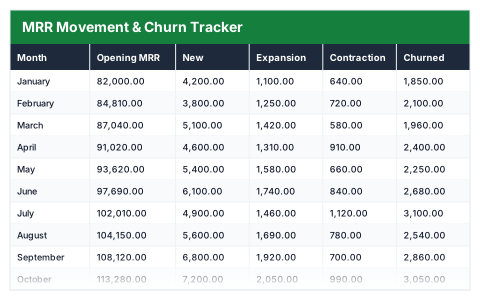
Monthly recurring revenue can grow while a business quietly loses customers. This Excel MRR movement tracker breaks every month into new, expansion, contraction and churned revenue, carries the balance forward and shows growth, gross churn and net revenue retention.
The year summary shows opening and closing MRR, growth over the year, average churn and NRR, the best and worst months, and how much growth came from existing customers.
Good for
- →SaaS founders reporting MRR to investors
- →Seeing whether growth comes from new or existing customers
- →Tracking the effect of a price change on churn and expansion
What it works out for you
The year in one place
- →Opening MRR
- →Closing MRR
- →Growth over the year
- →New business won
- →Expansion from existing customers
- →Contraction
- →Churned revenue
- →Average gross churn
- →Average net revenue retention
- →Best month (net new)
- →Worst month (net new)
- →Months that went backwards
- →Expansion as a share of growth
What you fill in
The table has 11 columns. Calculated columns fill themselves in; the rest are yours to type over.
- →Month
- →Opening MRR
- →New
- →Expansion
- →Contraction
- →Churned
- →Net new
- →Closing MRR
- →Growth
- →Gross churn
- →Net retention
How to use it
Enter the four movements each month. Opening balances carry forward, and net revenue retention is measured on the customers you started the month with.
The file opens with sample rows so you can see every formula working before you change anything. Type your own figures over them. When you need more rows, insert them inside the existing block rather than underneath it, so the totals keep covering every row.
Functions it uses
Every one of these exists in Excel, Google Sheets and LibreOffice, so the file behaves the same wherever you open it.
AVERAGECOUNTIFIFERRORMAXMINSUMQuestions about the MRR Movement & Churn Tracker
What is net revenue retention?
The revenue kept from the customers you started the month with, after expansion, contraction and churn, as a share of opening MRR. Above 100% means existing customers are growing revenue on their own.
What is the difference between contraction and churn?
Contraction is a customer paying less, such as downgrading a plan. Churn is a customer leaving altogether.
Why is new business left out of net revenue retention?
NRR measures what happens to existing customers. New customers count towards growth, not retention.