Sales template
Commission Calculator
Tiered rates that step up with attainment — change the tiers and every rep recalculates.
- Live formulas
- 24
- Columns
- 6
- File
- 8 KB
$5
Checkout opening soonOr get it with all 66 paid templates in the complete pack — $45.
Works in Excel 2013 and later, Microsoft 365, Google Sheets and LibreOffice Calc. Set up to print on one page wide.
About this Commission Calculator template
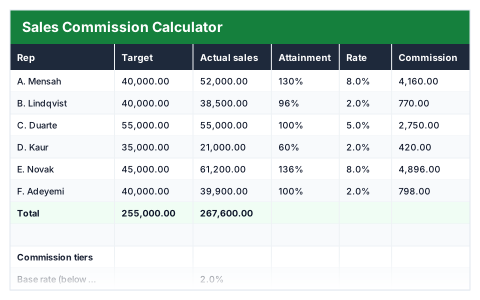
Tiered commission plans are easy to explain and easy to get wrong in a spreadsheet. This Excel commission calculator compares each rep's actual sales with their target, works out attainment and applies the rate for the tier they reach.
Change the base rate, the on-target threshold and rate, or the accelerator threshold and rate, and every rep's commission recalculates. The payout summary shows total commission, reps at or above target and reps on the accelerator.
Good for
- →Sales managers working out monthly or quarterly commission
- →Testing a new commission plan before rolling it out
- →Showing reps exactly how their pay is calculated
What it works out for you
Payout
- →Total commission
- →Reps at or above target
- →Reps on accelerator
- →Team attainment
What you fill in
The table has 6 columns. Calculated columns fill themselves in; the rest are yours to type over.
- →Rep
- →Target
- →Actual sales
- →Attainment
- →Rate
- →Commission
Settings in the “Commission tiers” box
- →Base rate (below target)
- →On-target threshold
- →On-target rate
- →Accelerator threshold
- →Accelerator rate
How to use it
The rate steps up as attainment passes each threshold. Change the tiers below and every row follows.
The file opens with sample rows so you can see every formula working before you change anything. Type your own figures over them. When you need more rows, insert them inside the existing block rather than underneath it, so the totals keep covering every row.
Shaded, boxed cells below the table are settings the formulas read from. Change those first — every row that depends on them updates at once.
Functions it uses
Every one of these exists in Excel, Google Sheets and LibreOffice, so the file behaves the same wherever you open it.
COUNTIFIFIFERRORSUMQuestions about the Commission Calculator
How do the tiers work?
Below the on-target threshold the base rate applies. Past it the on-target rate applies, and past the accelerator threshold the higher accelerator rate applies.
Does the higher rate apply to all sales or only sales above the threshold?
The rate for the tier a rep reaches applies to all of their sales. If your plan pays the higher rate only on the part above the threshold, the commission formula needs changing.
Can I model a different plan?
Yes. Every threshold and rate is an input, so you can try different plans and watch the total payout change.