Sales template
Customer Contact List
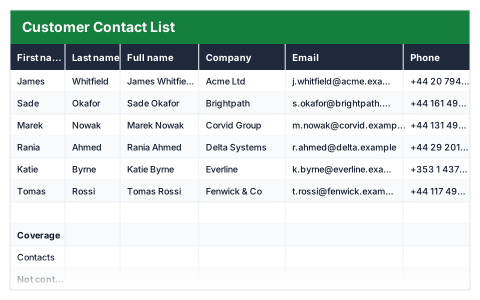
Full names build themselves, with days since last contact so nobody goes cold.
- Live formulas
- 17
- Columns
- 8
- File
- 8 KB
$5
Checkout opening soonOr get it with all 66 paid templates in the complete pack — $45.
Works in Excel 2013 and later, Microsoft 365, Google Sheets and LibreOffice Calc. Set up to print on one page wide.
About this Customer Contact List template
Customers go quiet when nobody notices how long it has been. This Excel customer contact list keeps each person's name, company, email, phone and the date they were last contacted, builds their full name automatically and counts the days since you were last in touch.
The coverage summary shows total contacts, how many have not been contacted in 30 or 60 days, the number of distinct companies and the longest gap.
Good for
- →Small businesses keeping in touch with customers
- →Account managers planning who to call this week
- →A tidy contact list before moving to a CRM
What it works out for you
Coverage
- →Contacts
- →Not contacted in 30+ days
- →Not contacted in 60+ days
- →Distinct companies
- →Longest gap (days)
What you fill in
The table has 8 columns. Calculated columns fill themselves in; the rest are yours to type over.
- →First name
- →Last name
- →Full name
- →Company
- →Phone
- →Last contacted
- →Days since
How to use it
One row per person — never two people in one cell. Days since last contact updates every time you open the file.
The file opens with sample rows so you can see every formula working before you change anything. Type your own figures over them. When you need more rows, insert them inside the existing block rather than underneath it, so the totals keep covering every row.
Functions it uses
Every one of these exists in Excel, Google Sheets and LibreOffice, so the file behaves the same wherever you open it.
COUNTACOUNTIFIFERRORMAXSUMPRODUCTTODAYTRIMQuestions about the Customer Contact List
How are days since last contact worked out?
Today's date minus the last contacted date, so it is up to date whenever you open the file.
Why one person per row?
Sorting, filtering and counting only work when each row is one person. Two people in one cell cannot be counted or sorted properly.
Is it OK to keep customer details in a spreadsheet?
Store the file somewhere access-controlled and keep only what you need. Contact details are personal data under UK GDPR.