Projects template
Milestone Tracker
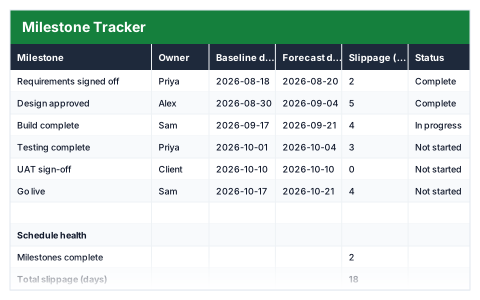
Baseline against forecast, showing slippage in days per milestone.
- Live formulas
- 11
- Columns
- 6
- File
- 8 KB
$5
Checkout opening soonOr get it with all 66 paid templates in the complete pack — $45.
Works in Excel 2013 and later, Microsoft 365, Google Sheets and LibreOffice Calc. Set up to print on one page wide.
About this Milestone Tracker template
Projects slip one milestone at a time, and it is easy to miss until the end date moves. This Excel milestone tracker records the baseline date you committed to and the current forecast date for every milestone, and works out the slippage in days.
The schedule health summary shows milestones complete, total and worst slippage, how many milestones are slipping and the next one due.
Good for
- →Reporting schedule progress to a project board
- →Spotting early slippage before it hits the end date
- →Tracking key dates on a long programme
What it works out for you
Schedule health
- →Milestones complete
- →Total slippage (days)
- →Worst slippage
- →Milestones slipping
- →Next milestone due
What you fill in
The table has 6 columns. Calculated columns fill themselves in; the rest are yours to type over.
- →Milestone
- →Owner
- →Baseline date
- →Forecast date
- →Slippage (days)
- →Status
How to use it
Baseline is the date you originally committed to. Slippage compares forecast against it, so the damage is visible early.
The file opens with sample rows so you can see every formula working before you change anything. Type your own figures over them. When you need more rows, insert them inside the existing block rather than underneath it, so the totals keep covering every row.
Functions it uses
Every one of these exists in Excel, Google Sheets and LibreOffice, so the file behaves the same wherever you open it.
COUNTIFIFIFERRORMAXMINSUMTEXTQuestions about the Milestone Tracker
What is a baseline date?
The date you originally agreed for the milestone. It should not change once set, so slippage is always measured against the original commitment.
How is slippage calculated?
Forecast date minus baseline date, in days. A positive number means the milestone is running late.
What should I change when a milestone slips?
Update the forecast date and leave the baseline alone, so the tracker keeps showing the true slippage.