Business template
Mileage Log
Set your rate once and every journey plus the claim total follows it.
- Live formulas
- 9
- Columns
- 6
- File
- 8 KB
$5
Checkout opening soonOr get it with all 66 paid templates in the complete pack — $45.
Works in Excel 2013 and later, Microsoft 365, Google Sheets and LibreOffice Calc. Set up to print on one page wide.
About this Mileage Log template
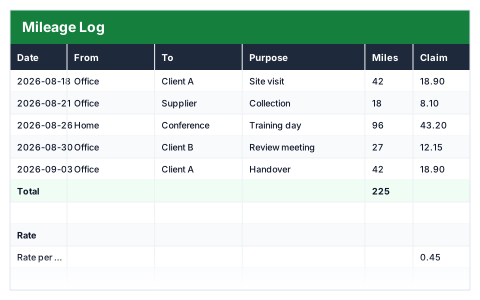
A mileage claim needs a record of every business journey: when, where and why. This Excel mileage log keeps one row per journey with the date, start, destination, purpose and miles, and works out the claim at the rate per mile you set.
Change the rate once and every journey recalculates, along with the total claim, the number of journeys and the longest trip.
Good for
- →Employees claiming business mileage in a personal car
- →Self-employed people recording business travel
- →Keeping evidence behind a mileage claim
What it works out for you
Claim
- →Total claim
- →Journeys logged
- →Longest journey (miles)
What you fill in
The table has 6 columns. Calculated columns fill themselves in; the rest are yours to type over.
- →Date
- →From
- →To
- →Purpose
- →Miles
- →Claim
Settings in the “Rate” box
- →Rate per mile
How to use it
Change the rate below and every claim recalculates. Keep one row per journey for a clean audit trail.
The file opens with sample rows so you can see every formula working before you change anything. Type your own figures over them. When you need more rows, insert them inside the existing block rather than underneath it, so the totals keep covering every row.
Shaded, boxed cells below the table are settings the formulas read from. Change those first — every row that depends on them updates at once.
Functions it uses
Every one of these exists in Excel, Google Sheets and LibreOffice, so the file behaves the same wherever you open it.
COUNTAMAXSUMQuestions about the Mileage Log
What rate per mile should I use?
The rate your employer pays, or HMRC's approved mileage rate for your vehicle if you are self-employed. The rate is an input, so it is easy to update.
Why record the purpose of each journey?
A claim needs to show each journey was for business. A clear purpose on every row makes the log stand up if it is ever checked.
Does it handle a lower rate after a mileage threshold?
No — it applies one rate to every mile. If your rate drops after a set number of miles, start a new log with the new rate at that point.