Business template
Inventory Tracker
Flags "Reorder" and "Out of stock" against your own levels, with total stock value.
- Live formulas
- 19
- Columns
- 7
- File
- 8 KB
$5
Checkout opening soonOr get it with all 66 paid templates in the complete pack — $45.
Works in Excel 2013 and later, Microsoft 365, Google Sheets and LibreOffice Calc. Set up to print on one page wide.
About this Inventory Tracker template
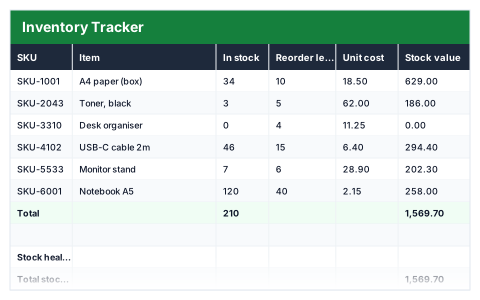
Running out of a best-seller costs sales, and over-ordering ties up cash. This Excel inventory tracker records each item's stock level, reorder level and unit cost, flags lines that need reordering or are out of stock, and values your stock line by line.
The stock health summary shows total stock value, how many lines are out of stock or need reordering, the number of distinct SKUs and your most valuable line.
Good for
- →Small shops and online sellers managing stock
- →Building a weekly buying list
- →Knowing how much money is sitting on the shelves
What it works out for you
Stock health
- →Total stock value
- →Lines out of stock
- →Lines needing reorder
- →Distinct SKUs
- →Most valuable line
What you fill in
The table has 7 columns. Calculated columns fill themselves in; the rest are yours to type over.
- →SKU
- →Item
- →In stock
- →Reorder level
- →Unit cost
- →Stock value
- →Status
How to use it
Status watches quantity against the reorder level and colours itself. Sort or filter on it to get your buying list.
The file opens with sample rows so you can see every formula working before you change anything. Type your own figures over them. When you need more rows, insert them inside the existing block rather than underneath it, so the totals keep covering every row.
Functions it uses
Every one of these exists in Excel, Google Sheets and LibreOffice, so the file behaves the same wherever you open it.
COUNTACOUNTIFIFINDEXMATCHMAXSUMQuestions about the Inventory Tracker
How does the reorder flag work?
Each item's quantity is compared with the reorder level you set for it, and the status changes to Reorder or Out of stock as stock runs down.
How do I get a buying list?
Filter or sort the Status column to show only the Reorder and Out of stock lines.
Does it track stock movements over time?
No. It is a snapshot of current stock. Update the quantities as stock comes in and goes out.