Sales template
Sales Forecast
Monthly target against actual, with a running variance and a year-end projection.
- Live formulas
- 44
- Columns
- 6
- File
- 8 KB
$5
Checkout opening soonOr get it with all 66 paid templates in the complete pack — $45.
Works in Excel 2013 and later, Microsoft 365, Google Sheets and LibreOffice Calc. Set up to print on one page wide.
About this Sales Forecast template
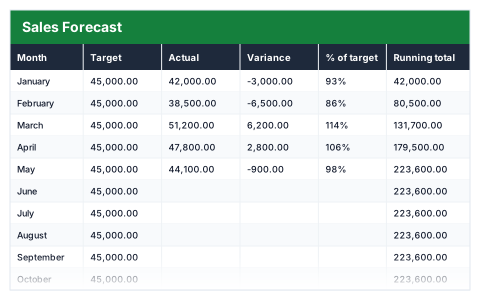
A sales target is only useful if you know early whether you will hit it. This Excel sales forecast compares each month's actual sales with the target, shows the variance and percentage of target, and keeps a running total.
The outlook projects your year-end figure from the months reported so far and compares it with the annual target, so the forecast sharpens as the year goes on.
Good for
- →Tracking a yearly sales target month by month
- →Reporting progress to directors or investors
- →Deciding early whether a target needs a push
What it works out for you
Outlook
- →Months reported
- →Average month so far
- →Year-end projection
- →Against annual target
- →Best month
What you fill in
The table has 6 columns. Calculated columns fill themselves in; the rest are yours to type over.
- →Month
- →Target
- →Actual
- →Variance
- →% of target
- →Running total
How to use it
Fill actuals in as each month closes. The projection uses your average so far, so it sharpens as the year goes on.
The file opens with sample rows so you can see every formula working before you change anything. Type your own figures over them. When you need more rows, insert them inside the existing block rather than underneath it, so the totals keep covering every row.
Functions it uses
Every one of these exists in Excel, Google Sheets and LibreOffice, so the file behaves the same wherever you open it.
AVERAGEIFCOUNTCOUNTIFIFIFERRORINDEXMATCHMAXSUMQuestions about the Sales Forecast
How is the year-end projection worked out?
It uses the average of the months with actual figures entered to estimate the months still to come.
What if a month has not closed yet?
Leave its actual blank. Only months with a figure count towards the average, so an unreported month does not drag the projection down.
Does it account for seasonality?
No. It projects from your average so far, so if your sales are strongly seasonal treat the projection as a rough guide.