Data template
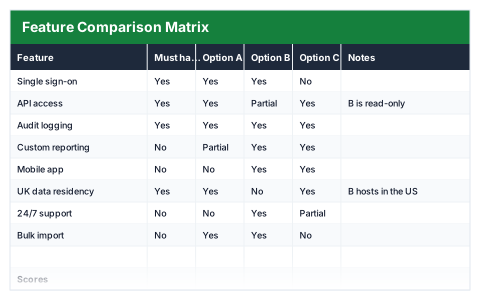
Feature Comparison Matrix
Compare vendors or products feature by feature, with a must-have check that fails loudly.
- Live formulas
- 6
- Columns
- 6
- File
- 8 KB
$5
Checkout opening soonOr get it with all 66 paid templates in the complete pack — $45.
Works in Excel 2013 and later, Microsoft 365, Google Sheets and LibreOffice Calc. Set up to print landscape on one page wide.
About this Feature Comparison Matrix template
Comparing products feature by feature is easy to get wrong: a long list of nice-to-haves can hide a missing essential. This Excel feature comparison matrix marks each feature Yes, No or Partial for up to three options and records whether it is a must-have.
Each option gets a score, and any must-have marked No counts as a failure for that option, so an option missing an essential cannot win on points alone.
Good for
- →Choosing software or a supplier
- →Evaluating tender responses
- →Comparing products before a purchase
What it works out for you
Scores
- →Option A score
- →Option B score
- →Option C score
- →Option A must-have failures
- →Option B must-have failures
- →Option C must-have failures
What you fill in
The table has 6 columns. Calculated columns fill themselves in; the rest are yours to type over.
- →Feature
- →Must have?
- →Option A
- →Option B
- →Option C
- →Notes
How to use it
Mark Yes, No or Partial. Any must-have marked No fails that option outright, regardless of its score.
The file opens with sample rows so you can see every formula working before you change anything. Type your own figures over them. When you need more rows, insert them inside the existing block rather than underneath it, so the totals keep covering every row.
Functions it uses
Every one of these exists in Excel, Google Sheets and LibreOffice, so the file behaves the same wherever you open it.
COUNTIFCOUNTIFSQuestions about the Feature Comparison Matrix
How are options scored?
Each option's score is built from its Yes, No and Partial answers, and must-have failures are counted separately so you can rule out any option that misses an essential.
What does Partial mean?
The feature exists but with limits, such as only on a higher plan. Record the detail in the Notes column.
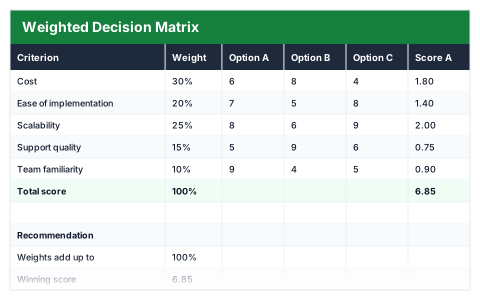
How is this different from the Weighted Decision Matrix?
The comparison matrix checks whether features exist. The decision matrix scores options against criteria that carry different weights.