Finance template
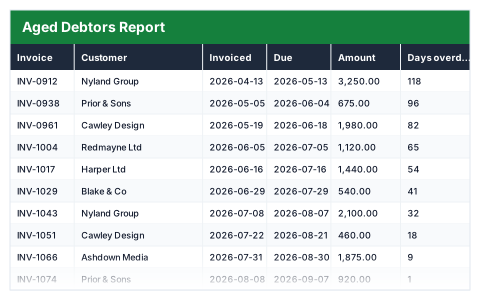
Aged Debtors Report
Unpaid invoices bucketed into current, 30, 60 and 90+ days, with the value at risk in each.
- Live formulas
- 129
- Columns
- 11
- File
- 9 KB
$5
Checkout opening soonOr get it with all 66 paid templates in the complete pack — $45.
Works in Excel 2013 and later, Microsoft 365, Google Sheets and LibreOffice Calc. Set up to print landscape on one page wide.
About this Aged Debtors Report template
An aged debtors report shows who owes you money and how late they are. This Excel template takes each unpaid invoice, works out its due date from your payment terms and measures how many days overdue it is against today's date.
Every invoice lands in exactly one bucket — current, 1–30, 31–60, 61–90 or 90+ days — so you can see how much money is at risk and which customers to chase first.
Good for
- →Month-end credit control for small businesses
- →Deciding which overdue invoices to chase first
- →Showing an accountant or lender the state of your debtor book
What it works out for you
Debt at a glance
- →Total owed
- →Not yet due
- →Overdue
- →Overdue as a share of the book
- →Older than 60 days
- →Invoices older than 60 days
- →Oldest invoice (days overdue)
- →Average days overdue
- →Largest single debt
- →Invoices on the report
- →Average invoice value
What you fill in
The table has 11 columns. Calculated columns fill themselves in; the rest are yours to type over.
- →Invoice
- →Customer
- →Invoiced
- →Due
- →Amount
- →Days overdue
- →Current
- →1–30 days
- →31–60 days
- →61–90 days
- →90+ days
Settings in the “Settings” box
- →Payment terms (days)
How to use it
Ageing is measured from the due date against today, so the report is current every time you open it. Only unpaid invoices belong here.
The file opens with sample rows so you can see every formula working before you change anything. Type your own figures over them. When you need more rows, insert them inside the existing block rather than underneath it, so the totals keep covering every row.
Shaded, boxed cells below the table are settings the formulas read from. Change those first — every row that depends on them updates at once.
Functions it uses
Every one of these exists in Excel, Google Sheets and LibreOffice, so the file behaves the same wherever you open it.
ANDAVERAGECOUNTCOUNTIFIFIFERRORMAXSUMTODAYQuestions about the Aged Debtors Report
Does the ageing update by itself?
Yes. Days overdue is calculated against TODAY(), so the buckets are correct every time you open the file.
Is ageing measured from the invoice date or the due date?
From the due date. That is the invoice date plus the payment terms you set, so an invoice only counts as overdue once its terms have passed.
Should paid invoices stay on the report?
No. The report is for money still owed. Remove invoices once they are paid, or track every invoice in the Invoice Payment Tracker instead.