Personal template
Wedding Budget Planner
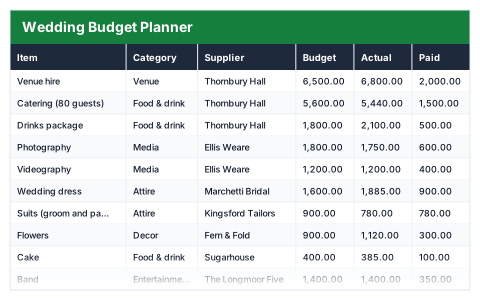
Budget against actual by supplier, with deposits paid, balances still due and what is left to allocate.
- Live formulas
- 72
- Columns
- 9
- File
- 10 KB
$5
Checkout opening soonOr get it with all 66 paid templates in the complete pack — $45.
Works in Excel 2013 and later, Microsoft 365, Google Sheets and LibreOffice Calc. Set up to print landscape on one page wide.
About this Wedding Budget Planner template
Wedding costs creep up one supplier at a time. This Excel wedding budget planner lists every item with its category and supplier, compares what you budgeted with what it actually costs, and tracks deposits paid and balances still due.
Set your total budget and the summary shows planned and actual spend, what is left to allocate, what is paid and still to pay, lines over budget, the biggest overspend and how much is going on the venue and catering.
Good for
- →Couples planning a wedding budget
- →Tracking supplier deposits and final balances
- →Deciding where to cut back when costs rise
What it works out for you
Where the money is going
- →Total budget
- →Planned spend
- →Actual spend
- →Left to allocate
- →Paid so far
- →Still to pay
- →Over or under the plan
- →Budget used
- →Lines over budget
- →Biggest overspend
- →Suppliers fully settled
- →Venue and catering
- →Share going on venue and catering
What you fill in
The table has 9 columns. Calculated columns fill themselves in; the rest are yours to type over.
- →Item
- →Category
- →Supplier
- →Budget
- →Actual
- →Paid
- →Still to pay
- →Over / under
- →Status
Settings in the “Budget” box
- →Total you can spend
How to use it
Set the total budget in the box below. Each line tracks what you planned, what it actually costs, what you have paid and what is still owed.
The file opens with sample rows so you can see every formula working before you change anything. Type your own figures over them. When you need more rows, insert them inside the existing block rather than underneath it, so the totals keep covering every row.
Shaded, boxed cells below the table are settings the formulas read from. Change those first — every row that depends on them updates at once.
Functions it uses
Every one of these exists in Excel, Google Sheets and LibreOffice, so the file behaves the same wherever you open it.
COUNTIFIFIFERRORMAXMINSUMSUMIFQuestions about the Wedding Budget Planner
What does each supplier's status mean?
Settled means paid in full, Deposit paid means part-paid, and Nothing paid means no payment has been made yet.
What is the difference between planned and actual spend?
Planned is your original budget for each item. Actual is the real cost once quoted or booked, so the difference shows where the budget is under pressure.
Can I use it for another kind of event?
Yes. Rename the items and categories and it works for any event with several suppliers.