Personal template
Bill Payment Tracker
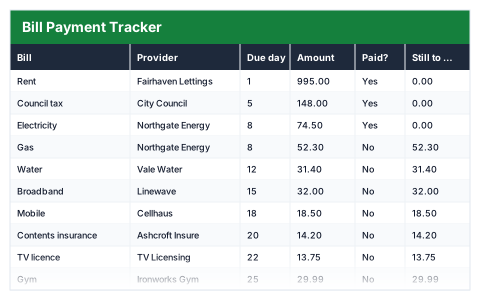
Every household bill with its due day, what is still to pay this month, and what the year costs.
- Live formulas
- 47
- Columns
- 8
- File
- 9 KB
Free
Download .xlsxNo signup, no email. Yours to edit and use commercially.
Works in Excel 2013 and later, Microsoft 365, Google Sheets and LibreOffice Calc. Set up to print on one page wide.
About this Bill Payment Tracker template
Missing a bill payment usually costs more than the bill. This free Excel bill payment tracker lists every household bill with its provider, due day and amount, lets you mark each one paid, and flags any that are overdue against today's date.
The monthly summary shows the total due, what has been paid, what is still to pay, overdue bills and their value, and what your bills cost over a year.
Good for
- →Keeping on top of monthly household bills
- →Seeing the real yearly cost of regular payments
- →Sharing bill responsibilities with a partner or housemates
What it works out for you
This month
- →Bills due
- →Monthly total
- →Paid so far
- →Still to pay
- →Overdue bills
- →Overdue value
- →Cost per year
- →Largest bill
What you fill in
The table has 8 columns. Calculated columns fill themselves in; the rest are yours to type over.
- →Bill
- →Provider
- →Due day
- →Amount
- →Paid?
- →Still to pay
- →Status
- →Annual cost
How to use it
Mark a bill Yes once paid. Status compares the due day against today, so overdue bills flag themselves.
The file opens with sample rows so you can see every formula working before you change anything. Type your own figures over them. When you need more rows, insert them inside the existing block rather than underneath it, so the totals keep covering every row.
Functions it uses
Every one of these exists in Excel, Google Sheets and LibreOffice, so the file behaves the same wherever you open it.
COUNTCOUNTIFDAYIFMAXSUMSUMIFTODAYQuestions about the Bill Payment Tracker
How does it know a bill is overdue?
It compares each bill's due day with today's date. If the due day has passed and the bill is not marked paid, it shows as Overdue.
Do I need to reset it each month?
Yes — set the Paid column back to No at the start of each month, or save a copy per month.
What about bills paid yearly or quarterly?
The yearly cost assumes monthly bills. The Subscription Tracker converts different billing periods to a monthly and yearly cost.