Personal template
Subscription Tracker
Every recurring payment normalised to a monthly and annual cost, with renewal dates.
- Live formulas
- 21
- Columns
- 8
- File
- 9 KB
$5
Checkout opening soonOr get it with all 66 paid templates in the complete pack — $45.
Works in Excel 2013 and later, Microsoft 365, Google Sheets and LibreOffice Calc. Set up to print on one page wide.
About this Subscription Tracker template
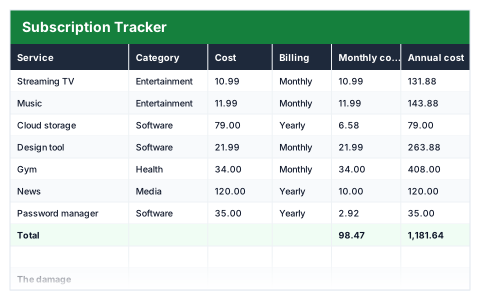
Subscriptions are designed to be forgotten. This Excel subscription tracker lists each service with its cost, billing period and renewal date, converts every one to a monthly and a yearly cost so they can be compared, and lets you mark whether to keep it.
The summary shows your total cost per month and per year, the yearly saving from subscriptions marked to cancel, the cost still under review and what renews in the next 30 days.
Good for
- →Finding subscriptions you no longer use
- →Budgeting for annual renewals
- →Cutting monthly outgoings
What it works out for you
The damage
- →Total per month
- →Total per year
- →Marked to cancel (yearly saving)
- →Under review (yearly)
- →Renewing in the next 30 days
What you fill in
The table has 8 columns. Calculated columns fill themselves in; the rest are yours to type over.
- →Service
- →Category
- →Cost
- →Billing
- →Monthly cost
- →Annual cost
- →Renews
- →Keep?
How to use it
Monthly and yearly subscriptions are normalised so you can compare them honestly. The annual total is usually the shock.
The file opens with sample rows so you can see every formula working before you change anything. Type your own figures over them. When you need more rows, insert them inside the existing block rather than underneath it, so the totals keep covering every row.
Functions it uses
Every one of these exists in Excel, Google Sheets and LibreOffice, so the file behaves the same wherever you open it.
COUNTIFSIFSUMSUMIFTODAYQuestions about the Subscription Tracker
How are monthly and yearly subscriptions compared?
Each one is converted to both a monthly and an annual cost, so a yearly plan and a monthly plan sit side by side on the same basis.
What does 'renewing in the next 30 days' show?
The subscriptions due to renew within the next 30 days, so you can cancel any before you are charged.
Does it cancel subscriptions for me?
No. It shows what you are paying so you can decide. Cancel with each provider directly.