Personal template
Grade Calculator
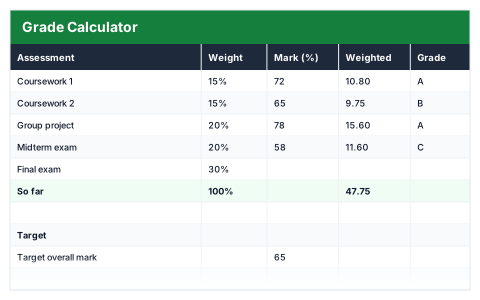
Weighted average and letter grade, plus what you still need on remaining assessments.
- Live formulas
- 16
- Columns
- 5
- File
- 8 KB
$5
Checkout opening soonOr get it with all 66 paid templates in the complete pack — $45.
Works in Excel 2013 and later, Microsoft 365, Google Sheets and LibreOffice Calc. Set up to print on one page wide.
About this Grade Calculator template
Knowing your average is useful; knowing what you need on the next assessment is more useful. This Excel grade calculator lists each assessment with its weight and mark, works out its weighted contribution and grade, and keeps a running average.
Set your target overall mark and it shows how much of the course has been graded, the weight still to come and the average you need on the remaining assessments to reach your target.
Good for
- →Students tracking module or course marks
- →Working out the exam mark needed to pass
- →Tutors sharing progress with students
What it works out for you
Where you stand
- →Weight graded so far
- →Average so far
- →Weight still to come
- →Needed on the rest to hit target
What you fill in
The table has 5 columns. Calculated columns fill themselves in; the rest are yours to type over.
- →Assessment
- →Weight
- →Mark (%)
- →Weighted
- →Grade
Settings in the “Target” box
- →Target overall mark
How to use it
Enter marks as they come back. Leave future assessments blank — the "needed to hit target" figure accounts for them.
The file opens with sample rows so you can see every formula working before you change anything. Type your own figures over them. When you need more rows, insert them inside the existing block rather than underneath it, so the totals keep covering every row.
Shaded, boxed cells below the table are settings the formulas read from. Change those first — every row that depends on them updates at once.
Functions it uses
Every one of these exists in Excel, Google Sheets and LibreOffice, so the file behaves the same wherever you open it.
IFIFERRORSUMSUMIFQuestions about the Grade Calculator
How is the average so far calculated?
Each mark is weighted by its assessment's weight, based only on the assessments that have been graded.
What if I have not taken an assessment yet?
Leave its mark blank. It is treated as still to come and counted in the weight remaining.
What does 'needed on the rest' mean?
The average mark you need across the remaining assessments to finish on your target. If it is above 100%, the target can no longer be reached.