HR template
Staff Rota Planner
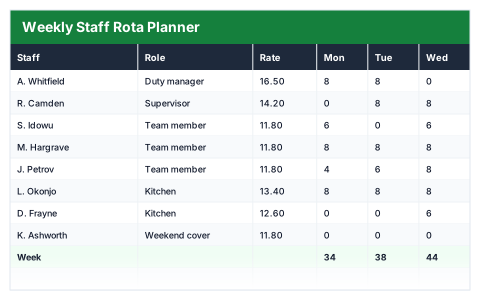
A week of shifts with hours and wage cost per person, and the day totals that show where you are thin.
- Live formulas
- 45
- Columns
- 13
- File
- 9 KB
$5
Checkout opening soonOr get it with all 66 paid templates in the complete pack — $45.
Works in Excel 2013 and later, Microsoft 365, Google Sheets and LibreOffice Calc. Set up to print landscape on one page wide.
About this Staff Rota Planner template
A rota should show the wage bill before the week starts, not after. This Excel staff rota planner records the hours each person works each day, works out their weekly hours and wage cost at their hourly rate, and totals every day.
Set the standard hours before overtime and the overtime uplift, and hours above the threshold are costed at the higher rate. The summary shows hours rostered, wage cost, cost per hour, overtime, and your busiest and quietest days.
Good for
- →Cafés, shops and hospitality businesses planning shifts
- →Checking the weekly wage bill against expected sales
- →Spotting days that are under- or over-staffed
What it works out for you
The week
- →Hours rostered
- →Wage cost
- →Average cost per hour
- →Staff on the rota
- →Average hours per person
- →Overtime hours
- →People over standard hours
- →Busiest day
- →Hours on the busiest day
- →Quietest day
- →Hours on the quietest day
What you fill in
The table has 13 columns. Calculated columns fill themselves in; the rest are yours to type over.
- →Staff
- →Role
- →Rate
- →Mon
- →Tue
- →Wed
- →Thu
- →Fri
- →Sat
- →Sun
- →Hours
- →Wage cost
- →Overtime hrs
Settings in the “Rules” box
- →Standard hours before overtime
- →Overtime uplift
How to use it
Enter hours worked under each day. Hours, cost and the day totals all follow, so you can see the wage bill before you publish the rota.
The file opens with sample rows so you can see every formula working before you change anything. Type your own figures over them. When you need more rows, insert them inside the existing block rather than underneath it, so the totals keep covering every row.
Shaded, boxed cells below the table are settings the formulas read from. Change those first — every row that depends on them updates at once.
Functions it uses
Every one of these exists in Excel, Google Sheets and LibreOffice, so the file behaves the same wherever you open it.
AVERAGECOUNTACOUNTIFIFERRORINDEXMATCHMAXMINSUMQuestions about the Staff Rota Planner
How is overtime paid?
Hours above the standard hours you set are paid at the hourly rate plus the overtime uplift, such as 50% extra.
Do I enter shift times or hours?
Hours. Enter the number of hours each person works each day rather than start and finish times.
Does it include employer costs like National Insurance?
No — it shows wage cost only. The Cost of Employment Calculator adds employer NI, pension and other costs.