Business template
Petty Cash Log
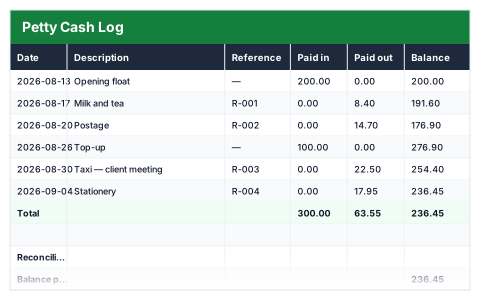
Running balance down every row, so the last figure is what should be in the tin.
- Live formulas
- 11
- Columns
- 6
- File
- 8 KB
$5
Checkout opening soonOr get it with all 66 paid templates in the complete pack — $45.
Works in Excel 2013 and later, Microsoft 365, Google Sheets and LibreOffice Calc. Set up to print on one page wide.
About this Petty Cash Log template
Petty cash goes missing in small amounts that are hard to trace later. This Excel petty cash log records every top-up and every payment with a date, description and reference, and carries a running balance down each row.
The reconciliation section compares the balance per the log with the cash you have counted in the tin, so any difference shows up straight away.
Good for
- →Offices keeping a cash tin for small purchases
- →Schools, clubs and charities tracking cash spending
- →A monthly petty cash check
What it works out for you
Reconciliation
- →Balance per this log
- →Counted in the tin
- →Entries logged
What you fill in
The table has 6 columns. Calculated columns fill themselves in; the rest are yours to type over.
- →Date
- →Description
- →Reference
- →Paid in
- →Paid out
- →Balance
How to use it
Every row carries the balance forward. If the bottom figure does not match the tin, the difference is in the rows above.
The file opens with sample rows so you can see every formula working before you change anything. Type your own figures over them. When you need more rows, insert them inside the existing block rather than underneath it, so the totals keep covering every row.
Functions it uses
Every one of these exists in Excel, Google Sheets and LibreOffice, so the file behaves the same wherever you open it.
COUNTASUMQuestions about the Petty Cash Log
What should I do if the log does not match the tin?
Check the rows since the last time it balanced. A missing receipt or a payment recorded twice is the usual cause.
Should top-ups go in the log?
Yes. Record money added to the tin as Paid in, so the running balance stays correct.
Can I use it for a bank account?
It is designed for cash. For a simple record of bank transactions with categories, the free Simple Cash Book works the same way.