Projects template
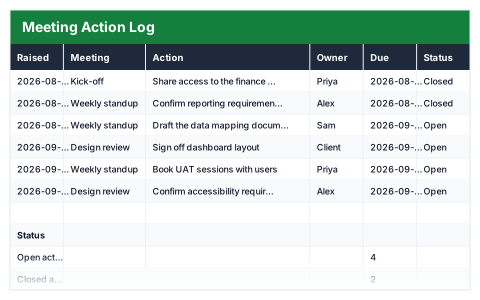
Meeting Action Log
One row per action, with overdue flagged against today automatically.
- Live formulas
- 10
- Columns
- 7
- File
- 8 KB
$5
Checkout opening soonOr get it with all 66 paid templates in the complete pack — $45.
Works in Excel 2013 and later, Microsoft 365, Google Sheets and LibreOffice Calc. Set up to print on one page wide.
About this Meeting Action Log template
Meetings produce actions, and actions get forgotten. This Excel meeting action log keeps one row per action with the meeting it came from, the owner, due date and status, and flags anything overdue against today's date.
The status summary counts open and closed actions, overdue actions and those due in the next seven days, so the next meeting can start with what has slipped.
Good for
- →Following up actions from team and board meetings
- →Keeping one action list across a series of meetings
- →Holding owners to their deadlines
What it works out for you
Status
- →Open actions
- →Closed actions
- →Overdue
- →Due in the next 7 days
What you fill in
The table has 7 columns. Calculated columns fill themselves in; the rest are yours to type over.
- →Raised
- →Meeting
- →Action
- →Owner
- →Due
- →Status
- →Overdue?
How to use it
Keep one row per action, not per discussion point. Overdue checks the due date against today every time you open the file.
The file opens with sample rows so you can see every formula working before you change anything. Type your own figures over them. When you need more rows, insert them inside the existing block rather than underneath it, so the totals keep covering every row.
Functions it uses
Every one of these exists in Excel, Google Sheets and LibreOffice, so the file behaves the same wherever you open it.
ANDCOUNTIFCOUNTIFSIFTODAYQuestions about the Meeting Action Log
How is an action flagged as overdue?
Its due date is compared with today's date and its status. An action past its due date that is still open is flagged.
Should I log discussion points too?
No — one row per action. Keep discussion in the minutes and record only what someone has agreed to do.
Can the whole team update it?
Yes. Save it to a shared drive or open it in Google Sheets so each owner can update their own actions.