Business template
Job Costing Sheet
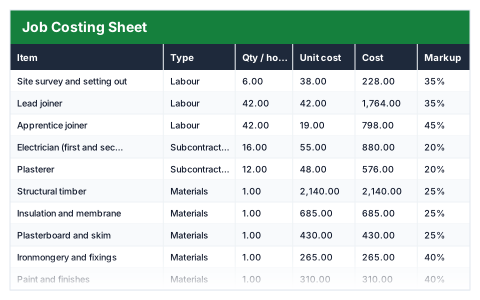
Labour, materials and subcontractors priced per line, with the margin on the job worked out as you go.
- Live formulas
- 67
- Columns
- 9
- File
- 9 KB
$5
Checkout opening soonOr get it with all 66 paid templates in the complete pack — $45.
Works in Excel 2013 and later, Microsoft 365, Google Sheets and LibreOffice Calc. Set up to print landscape on one page wide.
About this Job Costing Sheet template
Pricing a job on gut feel is how contractors end up working for nothing. This Excel job costing sheet lists every labour, materials, subcontractor and plant cost, applies your markup to each line and shows the profit and margin as you build the price.
It then adds your overhead recovery and contingency to show the true cost of the job, the true profit after overheads and the lowest price you can accept without losing money.
Good for
- →Builders, joiners and other trades pricing a job
- →Checking whether a finished job was actually profitable
- →Seeing whether labour or materials drive your costs
What it works out for you
Is this job worth doing?
- →Direct cost
- →Cost including overhead and contingency
- →Quoted to the customer
- →Gross profit
- →Gross margin
- →True profit after overhead
- →Lowest price you can accept
- →Labour cost
- →Materials cost
- →Subcontractor cost
- →Labour as a share of cost
What you fill in
The table has 9 columns. Calculated columns fill themselves in; the rest are yours to type over.
- →Item
- →Type
- →Qty / hours
- →Unit cost
- →Cost
- →Markup
- →Charged
- →Profit
- →Margin
Settings in the “Overhead and risk” box
- →Overhead recovery (% of cost)
- →Contingency (% of cost)
How to use it
Enter what the job costs you and the markup you want. The charge and the margin follow. The summary shows the price you cannot go below.
The file opens with sample rows so you can see every formula working before you change anything. Type your own figures over them. When you need more rows, insert them inside the existing block rather than underneath it, so the totals keep covering every row.
Shaded, boxed cells below the table are settings the formulas read from. Change those first — every row that depends on them updates at once.
Functions it uses
Every one of these exists in Excel, Google Sheets and LibreOffice, so the file behaves the same wherever you open it.
IFERRORSUMSUMIFQuestions about the Job Costing Sheet
What is the difference between markup and margin?
Markup is added on top of cost; margin is profit as a share of the selling price. A 25% markup gives a 20% margin, which is why the sheet shows both.
Why add overhead recovery?
Every job has to contribute to costs such as insurance, vans and admin. Leaving them out makes a job look more profitable than it is.
What does 'lowest price you can accept' mean?
Direct cost plus overhead recovery and contingency. Pricing below it means the job loses money.