Finance template
Debt Payoff Tracker
Snowball ordering with months-to-clear and the true interest cost of paying minimums.
- Live formulas
- 23
- Columns
- 7
- File
- 8 KB
$5
Checkout opening soonOr get it with all 66 paid templates in the complete pack — $45.
Works in Excel 2013 and later, Microsoft 365, Google Sheets and LibreOffice Calc. Set up to print on one page wide.
About this Debt Payoff Tracker template
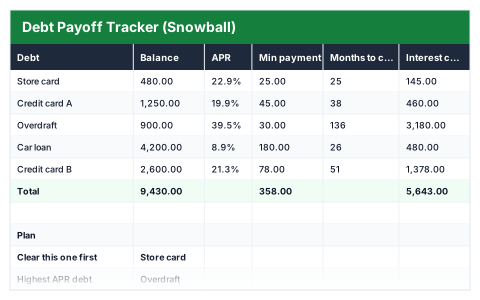
Listing every debt in one place is the first step to getting rid of them. This Excel debt payoff tracker takes each balance, APR and minimum payment, and works out how many months each debt takes to clear and how much interest it costs if you only pay the minimum.
It orders your debts snowball-style, smallest balance first, and names both the debt to clear first and your highest-APR debt.
Good for
- →Seeing the full cost of credit cards and loans in one table
- →Choosing which debt to tackle first
- →Understanding how long minimum payments keep you in debt
What it works out for you
Plan
- →Clear this one first
- →Highest APR debt
- →Total owed
- →Interest if minimums only
- →Longest payoff (months)
What you fill in
The table has 7 columns. Calculated columns fill themselves in; the rest are yours to type over.
- →Debt
- →Balance
- →APR
- →Min payment
- →Months to clear
- →Interest cost
- →Priority
How to use it
List every debt. Clear the smallest balance first, then roll its payment into the next — that is the snowball. Months to clear assumes you keep paying the minimum only.
The file opens with sample rows so you can see every formula working before you change anything. Type your own figures over them. When you need more rows, insert them inside the existing block rather than underneath it, so the totals keep covering every row.
Functions it uses
Every one of these exists in Excel, Google Sheets and LibreOffice, so the file behaves the same wherever you open it.
IFERRORINDEXMATCHMAXMINNPERRANKROUNDUPSUMQuestions about the Debt Payoff Tracker
What is the debt snowball method?
You pay the minimum on everything, put any extra towards the smallest balance, and once it is cleared roll that payment into the next smallest. The priority column orders debts this way.
Should I pay off the highest interest rate first instead?
Clearing the highest APR first — the avalanche method — usually costs less interest, while the snowball clears individual debts sooner. The tracker names both so you can choose.
How are months to clear worked out?
With Excel's NPER function, using each debt's balance, APR and minimum payment. It assumes you pay only the minimum and borrow nothing new.