Sales template
Customer Lifetime Value Calculator
Lifetime value per segment from churn and margin, set against what each one costs to acquire.
- Live formulas
- 52
- Columns
- 11
- File
- 9 KB
$5
Checkout opening soonOr get it with all 66 paid templates in the complete pack — $45.
Works in Excel 2013 and later, Microsoft 365, Google Sheets and LibreOffice Calc. Set up to print landscape on one page wide.
About this Customer Lifetime Value Calculator template
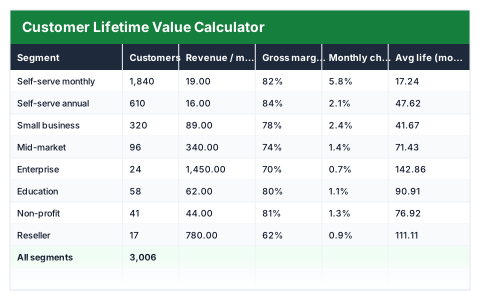
Knowing what a customer is worth tells you how much you can afford to spend winning one. This Excel customer lifetime value calculator works out average customer life from monthly churn, then lifetime value from revenue and gross margin, for each customer segment.
It compares lifetime value with acquisition cost, shows the LTV to CAC ratio and payback period, and marks each segment Healthy, Thin or Losing money.
Good for
- →Subscription and SaaS businesses setting marketing budgets
- →Comparing the value of different customer segments
- →Preparing unit economics for investors
What it works out for you
Portfolio
- →Customers
- →Monthly recurring revenue
- →Blended revenue per customer
- →Total lifetime value on the books
- →Blended lifetime value
- →Blended acquisition cost
- →Blended LTV : CAC
- →Best segment LTV : CAC
- →Worst segment LTV : CAC
- →Segments below 3:1
- →Longest payback (months)
What you fill in
The table has 11 columns. Calculated columns fill themselves in; the rest are yours to type over.
- →Segment
- →Customers
- →Revenue / month
- →Gross margin
- →Monthly churn
- →Avg life (months)
- →Lifetime value
- →Acquisition cost
- →LTV : CAC
- →Payback (months)
- →Verdict
How to use it
Average customer life is 1 ÷ monthly churn. LTV is margin-adjusted revenue over that life, and the last two columns say whether the acquisition spend is justified.
The file opens with sample rows so you can see every formula working before you change anything. Type your own figures over them. When you need more rows, insert them inside the existing block rather than underneath it, so the totals keep covering every row.
Functions it uses
Every one of these exists in Excel, Google Sheets and LibreOffice, so the file behaves the same wherever you open it.
COUNTIFIFIFERRORMAXMINSUMSUMPRODUCTQuestions about the Customer Lifetime Value Calculator
How is customer lifetime value calculated?
Monthly revenue per customer × gross margin × average customer life in months, where average life is 1 divided by monthly churn.
What is a good LTV to CAC ratio?
3:1 is a common benchmark, and segments at 3 or above are marked Healthy. Between 1 and 3 is Thin; below 1 means a customer costs more to win than they are worth.
What is the payback period?
How many months of gross profit it takes to earn back what you spent acquiring the customer.