Personal template
Household Bills Splitter
Shared bills split however you agreed, then netted off against who actually paid, so nobody argues.
- Live formulas
- 65
- Columns
- 9
- File
- 9 KB
$5
Checkout opening soonOr get it with all 66 paid templates in the complete pack — $45.
Works in Excel 2013 and later, Microsoft 365, Google Sheets and LibreOffice Calc. Set up to print landscape on one page wide.
About this Household Bills Splitter template
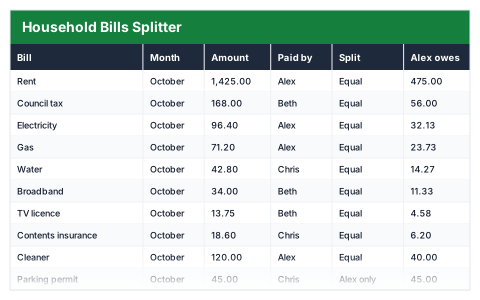
Shared houses fall out over money when nobody is sure who owes what. This Excel household bills splitter records each bill, who paid it and how it is split — equally, between two people or to one person — and works out each person's share.
The settling-up summary shows what each person paid, what they owe in total and whether they are owed money or owe it, with a check that every bill's split adds up.
Good for
- →Housemates sharing rent and bills
- →Couples splitting shared costs
- →Holidays and trips with shared expenses
What it works out for you
Settling up
- →Total household bills
- →Alex paid
- →Alex owes in total
- →Alex is owed / owes
- →Beth paid
- →Beth owes in total
- →Beth is owed / owes
- →Chris paid
- →Chris owes in total
- →Chris is owed / owes
- →Rows that do not add up
- →Cost per person if split evenly
What you fill in
The table has 9 columns. Calculated columns fill themselves in; the rest are yours to type over.
- →Bill
- →Month
- →Amount
- →Paid by
- →Split
- →Alex owes
- →Beth owes
- →Chris owes
- →Check
How to use it
Record who paid and how the bill splits. The Check column must read zero on every row — if it does not, the split does not add up to the bill.
The file opens with sample rows so you can see every formula working before you change anything. Type your own figures over them. When you need more rows, insert them inside the existing block rather than underneath it, so the totals keep covering every row.
Functions it uses
Every one of these exists in Excel, Google Sheets and LibreOffice, so the file behaves the same wherever you open it.
COUNTIFIFROUNDSUMSUMIFQuestions about the Household Bills Splitter
How does settling up work?
For each person, what they paid minus the total of their shares. A positive figure means they are owed money; a negative figure means they owe it.
What does the Check column do?
It shows the difference between the bill and the shares. It should be zero on every row; anything else means the split does not add up.
Can I use our own names?
Yes. The names are used in the column headers, the dropdowns and the formulas, so replace them with Find and Replace across the whole sheet.